Everyone can join.
Invite employees by email, including a personal address. Colleagues without a company mailbox or desk get the same stories.
Tell us about your plans.
We will help you find the right approach.
Springcast for internal communications
Give your organization a voice.
Internal podcasts and video in a private app.
For colleagues on site, on the move and in the office.
From €395 per month for Company including Springcast Mobile.
Excl. VAT, annual contract billed yearly.
 uses Springcast for internal podcasts
Trusted by 2,000+ organizations.
Podcasts and video. For the people in your organization.
Why Springcast
Your intranet holds the information. Springcast gives your stories a place on every employee’s phone, with access your IT team controls.
Invite employees by email, including a personal address. Colleagues without a company mailbox or desk get the same stories.
Sign in with single sign-on. With SCIM, joiners, role changes and leavers are handled through your identity provider.
Employees follow shows and, when notifications are on, get a push for new episodes. Chapters, a transcript and video sit with each episode.
See listening completion, likes, comments and emoji reactions. Use what comes back to shape the next episode.
Your quote covers your setup, not a price per listener. Adding a site or a team does not add listener fees.
Procurement & Security onboarding is included with Company and Enterprise. EU hosting and ISO/IEC 27001:2022 certification.
Behind every update is a story
The thinking behind a decision. A colleague’s experience.
The voice welcoming a new employee.
Let a leader explain why things are changing. With room for the questions people are asking.
A colleague shares what works at another location. A specialist explains a product change. Practical knowledge gets a voice, with video when there is something to show.
Introduce your people and their work. A personal introduction alongside guidance on the job.
Springcast Mobile
Your stories. On their phone.
When it suits them.
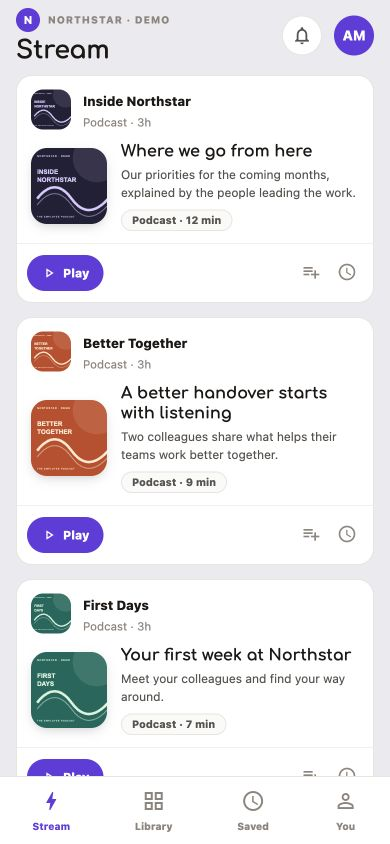
A show is a podcast series made up of episodes. Employees find the shows available to them. They listen, watch and comment in the same app.
Explore the possibilitiesRoom to read, too.
Add a transcript to your episode.
More than pressing play
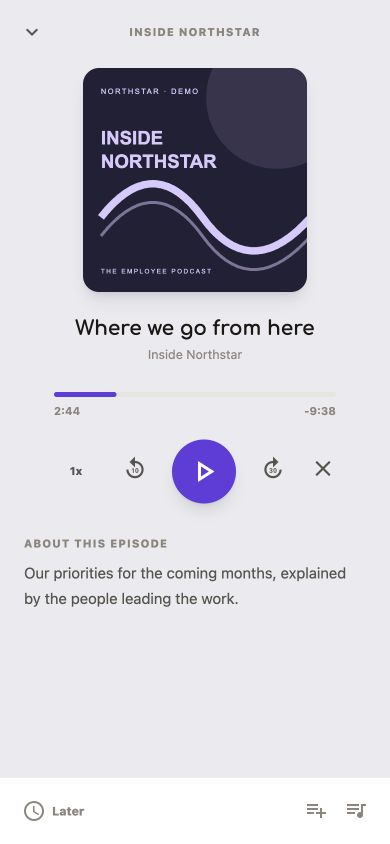
Listen on the move. Watch an explanation. Reread a passage.
Your team decides what content to include with each episode.
Audio & chapters
Listen at your own pace. Use chapters on the episode page to jump to the topic you are looking for.
Started an episode? Find it again in the app to keep listening.
Concept illustration · not an app interfaceAudio & video
Demonstrate a process or film a conversation. When an episode includes video, you can switch between audio and video at the same point in the episode.
An episode link takes listeners to the relevant instructions, document or background information.
Concept illustration · not an app interfaceTranscript
An added transcript sits with the episode as readable text. Useful for reading or finding a passage again.
The transcript uses the language of the episode. The app does not translate the content automatically.
Fictional passage · not an app interfaceFind a show or episode in the app. The library shows which shows are available to you.
Like an episode or leave a comment. New episodes can trigger a push notification if you follow the show and have enabled notifications.
The app interface is available in ten languages, including English, Dutch, German and Danish. Your episodes play in the language you publish them in.
Open conversations. A private space.
You link groups to shows.
Employees see what has been made available to them.
Example of group access
The workspace owner links each show to the appropriate groups individually.
Downloading the app alone does not grant access. Employees join through an invitation or their company login. Set a private show to private and link the appropriate groups.
The right way in for your people
Add an employee to a group and send an invitation. Once they accept, they create their own login credentials.
A personal email address works too, so colleagues without a company mailbox can join.
Employees use their company account. They do not need a separate password for the app. IT connects the app to your identity provider.
An option with a one-off fee on Company. Included with Enterprise.
IT can update users and group memberships and revoke access. This supports employees joining, changing roles and leaving.
Requires Mobile and SSO. Your team links groups to shows in the Springcast platform.
Choose the access route that suits your people.
Invitations, SSO and administration Security documentationAlongside your intranet
Introduce your show where your people already go. Then give the conversation a place of its own on their phone.
News, documents and work instructions. This is where you announce the show and explain how employees can get access.
Find shows, listen, watch and respond. Your team manages shows and episodes in the Springcast platform.
Announce your show on the intranet. Access runs through an invitation or company login, so only the right people listen.
Feedback & insights
How far do people listen? What questions are they asking?
Use what comes back to make the next episode better.
Included with Mobile
Springcast Mobile measures listening completion and interactions such as likes, comments and emoji reactions. Platform analytics adds downloads per episode, plus average portion played and completions in the Springcast player. Read comments alongside the episode and reply where it helps.
Moderation is included with Mobile.
Illustration of listening and responding · not measurement dataSeparate module
For onboarding and training, Springcast LMS shows each learner’s progress, completion and quiz results. It is a separate add-on on Company and available in Enterprise.
Explore onboarding and trainingWant the data in your own tools? Ask us about API and MCP access for your organization.
For IT & your DPO
Involve IT, your data protection officer and, where relevant, the works council early. We support each step.
Procurement & Security onboarding is included with Company and Enterprise: we support your supplier assessment with documentation and a point of contact.
Plans & setup
Choose Company or Enterprise for Springcast Mobile. Your access and setup requirements determine which plan fits.
From €395 per month for Company including Springcast Mobile.
Excl. VAT, annual contract billed yearly.
| What you need | Without MobileCompany Light | With MobileCompany | With MobileEnterprise |
|---|---|---|---|
| Springcast Mobile | Not included | Included | Included |
| SSO for Mobile | Not included | Option with a one-off fee | Included |
| SCIM for Mobile | Mobile not included | Included · SSO required | Included · SSO required |
| Comment moderation | Mobile not included | Included | Included |
| Procurement & Security onboarding | Service with a one-off fee | Included | Included |
Your quote covers the setup, shows, storage, data traffic and additional features you need. Springcast LMS for training has its own terms.
A white-label app is available. We agree the setup and costs separately; this option is not included as standard in every plan.
An annual contract with an annual invoice. You receive a new quote before renewal; the contract does not renew automatically.
From idea to your first episode
Decide on content, access and launch together.
Give your first show a clear start.
Who is the show for? What deserves attention? Assign an owner and arrange recording and editing, in-house or with a producer.
Agree invitations or SSO, groups, staff changes and measurement questions with IT. Choose the right plan.
Schedule publication. Set the show to private and link the groups. Add video, chapters and a transcript where they help.
Use your existing channels. Explain the app, access and how to follow shows. Name a point of contact.
Read comments and discuss the experience with employees. Use relevant metrics to improve the content and how you introduce it.
Already recorded video? You have the audio, too. Upload your video to an episode without audio and Springcast will use the audio from that video. Make sure the story also works without the visuals.
“With Springcast PRO, all our employees can listen to our internal podcasts even more easily.”
Kindergarden · Internal communications
Good to know
In Springcast Mobile, employees find the shows they have access to. They can listen to audio or watch video. Chapters, a transcript and video are available when your organization adds them to an episode.
Notifications for new episodes only reach employees who follow the show and have enabled notifications. Include following shows in your introduction.
When listening does not suit the moment, an added transcript lets people read instead.
Invite employees by email or let them sign in with their company account using SSO. SSO is an option with a one-off fee on Company and is included with Enterprise.
For a private show, set the show to private and link the appropriate groups. Downloading the app alone does not grant access. Group links are managed for each show individually.
SCIM supports user management when employees join, change roles or leave. It requires Mobile and SSO. Linking groups to shows remains a separate task for the workspace owner.
No company email? Employees can receive an invitation at a personal email address.
Springcast Mobile measures listening completion and interactions such as likes, comments and emoji reactions. Platform analytics shows downloads per episode, plus average portion played and completions in the Springcast player. For onboarding and training, Springcast LMS shows progress and results per learner.
Your intranet remains the place for news, documents and work instructions. Springcast adds a private listening space on the phone. Introduce your show on SharePoint or your other intranet and explain how employees get access. They then listen in the app.
Access runs through an invitation or company login. Your team manages shows and episodes in the Springcast platform.
Link to your show from the intranet; employees open it and listen in the app.
Springcast Mobile is included with Company and Enterprise. Company Light does not include a mobile app. Your quote specifies the shows, storage, data traffic and additional features in your setup.
There is no per-user fee for mobile listeners. The separate onboarding and training module has its own plan terms.
Explore the options for organizationsInvolve IT and your data protection officer in the login method, user management and the information you share. Your organization follows its own supplier assessment process.
Security and ISO documentation
EU hosting and data processing
Start with what you want to share
Explore the listening experience and discuss access, administration and your first show.
Request a demo using the contact form.
Explore how to set up a learning journey and the choices involved in implementation.