Skip to content
Springcast
ContactStart free

Springcast LMS

LMS for onboarding and employee training

Your experienced colleagues know how the work is done. Make that knowledge a course.

Build lessons from audio and video recorded by your own experts, or from text. Group them into courses and learning paths with tests. Employees learn in the Springcast app and can message a coach; you follow progress and results on the web.

Available as an add-on to Company and in Enterprise. Learning in the browser is coming soon.

Concept animation: a colleague's explanation becomes a lesson, lessons form a course, courses form a learning path, and the employee learns, takes the test and makes progress in the app.

Build a course

From a colleague's explanation to a learning path

The knowledge a new starter needs often sits with a handful of people: the planner who knows every route, the team lead who explains safety on site in five minutes. With Springcast LMS you record that explanation once and give it a place in a structured program.

  1. Record or write

    Audio or video from your own people, or text. Audio and video items are added under Content first and then linked to a lesson.

    AudioVideoText
  2. Make lessons and modules

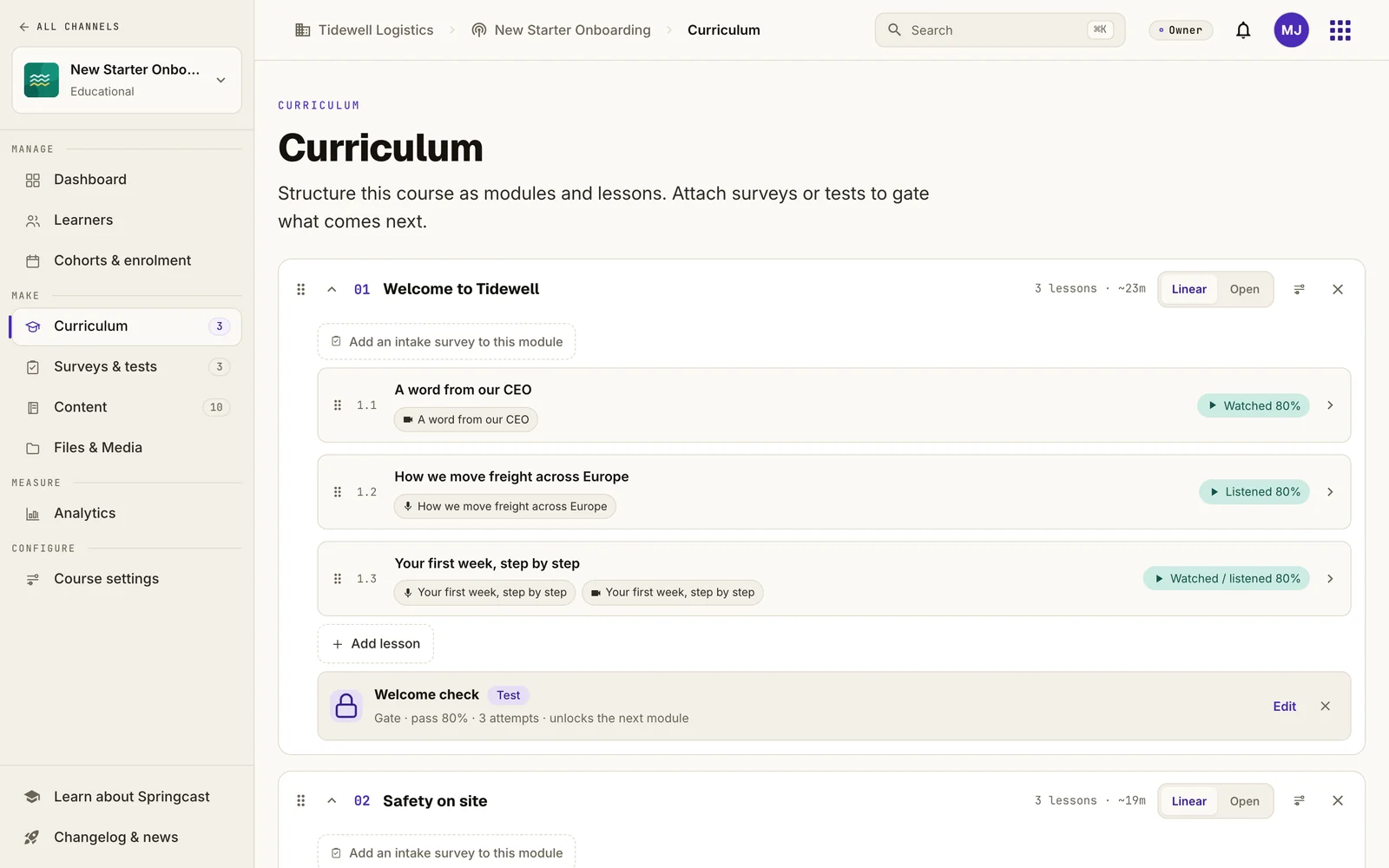
    A lesson holds an audio item, a video item, both, or text. For audio and video, you set when the lesson counts as complete: at the start, or at a percentage played that you choose.

  3. Add a test or survey

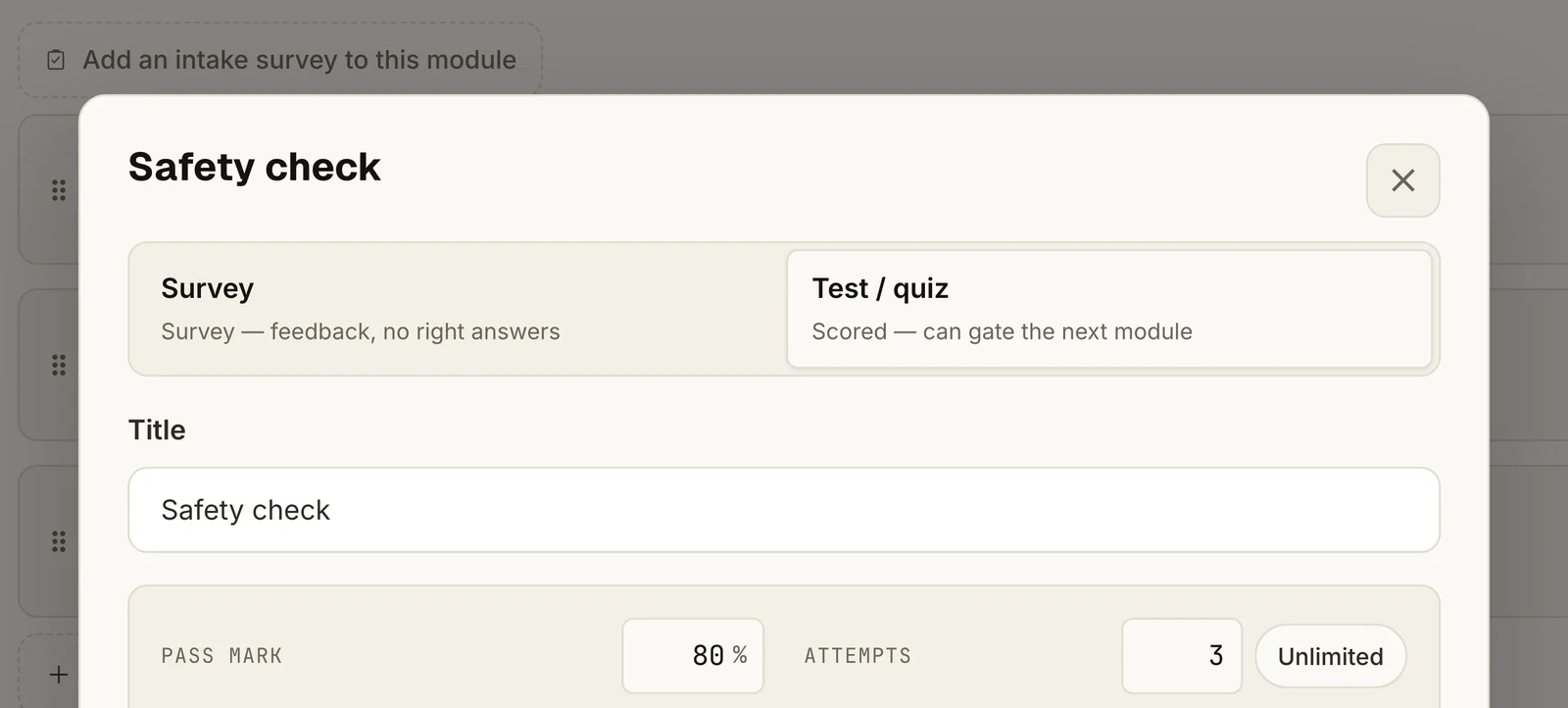
    A test has a score, a pass mark and a number of attempts. The result decides whether the learner can continue to the next step.

  4. Combine courses into a path

    A learning path puts several courses in order. Enrollment can be automatic based on conditions, manual or through SSO/SCIM, and one course can sit in several paths.

The curriculum of the course New Starter Onboarding in Springcast: a module with three lessons, each with its completion rule, followed by a test that unlocks the next module (example data)
Example dataThe curriculum of a course: modules, lessons with their completion rule, and a test that unlocks the next module.

Tests that decide the next step

Question types are single choice, multiple choice, true/false, rating and open text. Open answers are not graded automatically. Before a test, the learner sees the number of questions, the required score and the attempts left.

The settings of the test Safety check in Springcast: scored test selected, a pass mark of 80% and 3 attempts (example data)
Example data

Cohorts for every intake

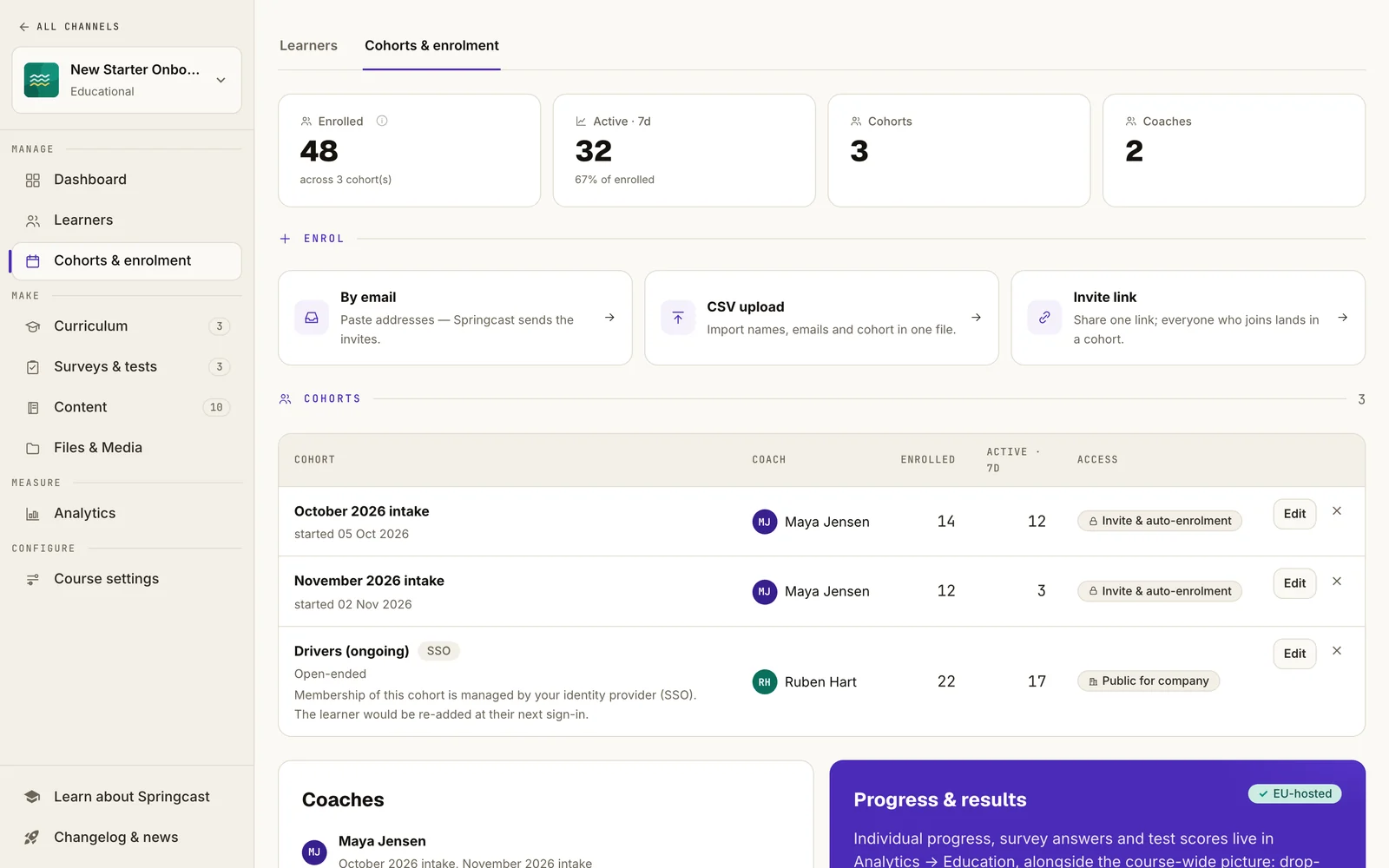
A cohort links learners to a course and a coach, with an optional start and end date. Invite people by email, CSV upload or an invite link, or connect Mobile groups through SSO. A course can also be made visible to everyone in your organization; employees can then enroll themselves in the app, as long as access and capacity allow.

The course content is yours and is not translated automatically. The app interface, including the test screens, is available in ten languages.

Cohorts and enrollment for a course in Springcast: enroll by email, CSV upload or invite link, and three cohorts, each with a coach and the number of learners (example data)
Example data

Learning in the app

Listen between jobs, then take the test

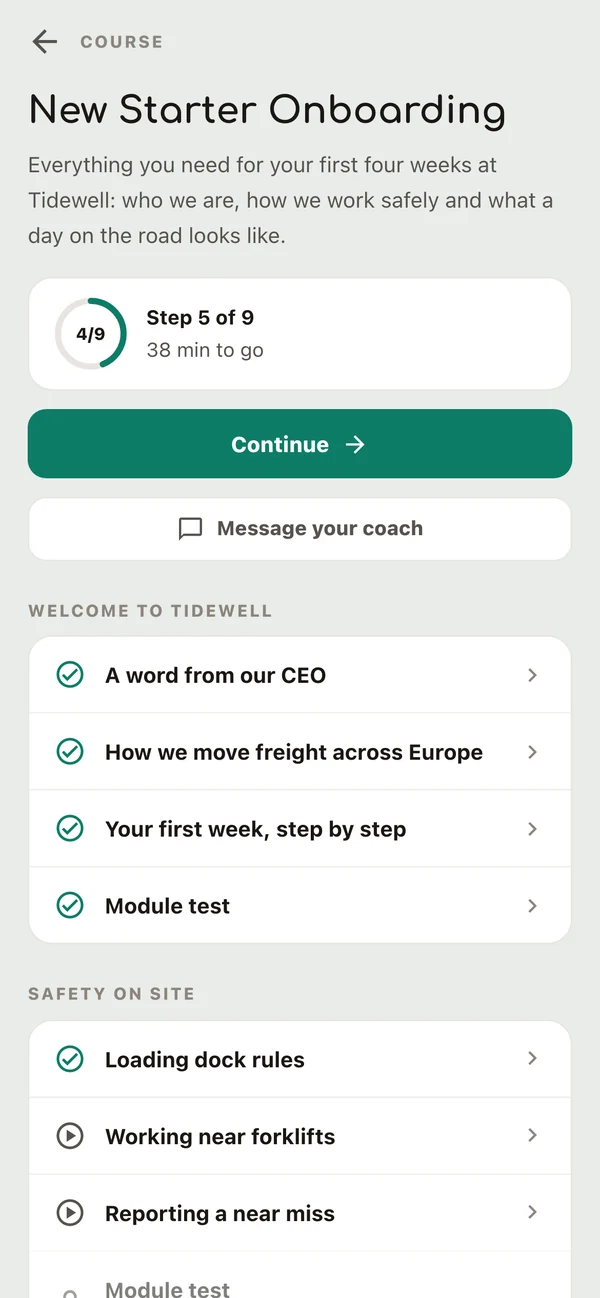
Employees open their courses in the Springcast app, next to any podcasts your organization publishes there. A course shows the next step and which lessons are done.

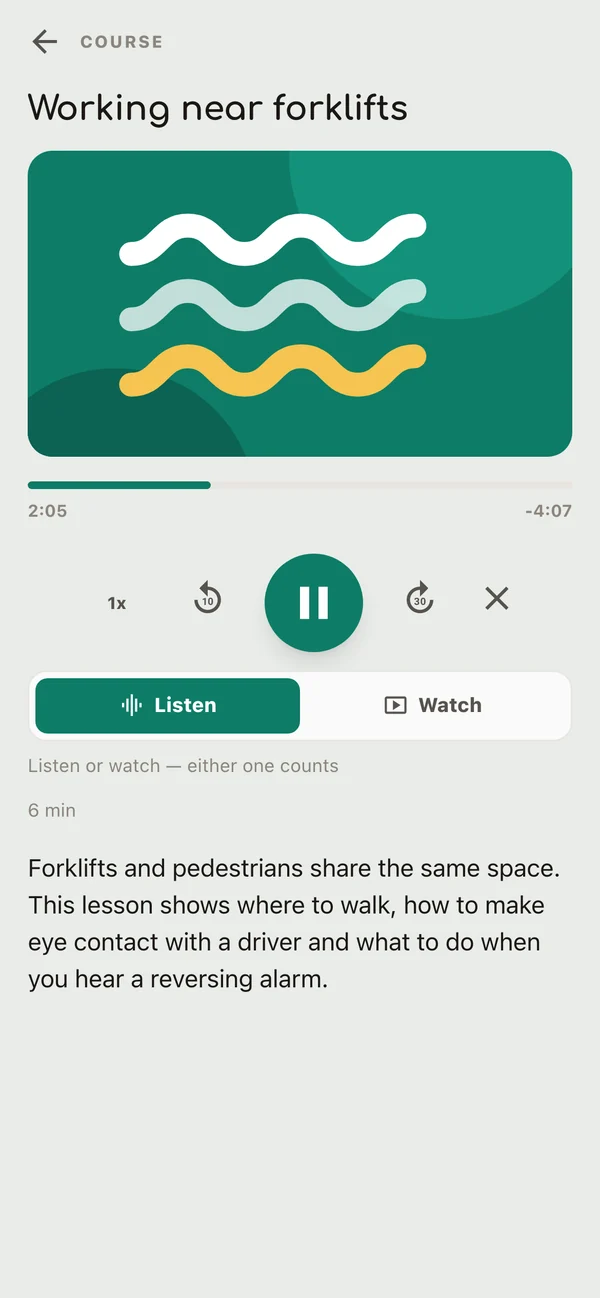
  • Listen, watch or read Audio and video lessons play in the app's player; a lesson can also contain text. When a lesson is complete, the next one is one tap away.
  • Take the test, see what was wrong After submitting, the learner sees the result and which questions were wrong, and can try again if attempts are left. The correct answers are not shown.
  • Ask a coach From the course, a learner starts a conversation with a coach. Coaches answer in Springcast and get a notification; after three hours unread, they receive one bundled email reminder.
  • Earn a certificate When certificates are on, completing the course generates a numbered PDF that the learner can save or share from the phone.
The course New Starter Onboarding in the Springcast app: step 5 of 9, a Continue button, a Message your coach button and the lessons per module (example data)
Example data
The lesson Working near forklifts playing as audio in the Springcast app, with playback controls and a choice between Listen and Watch (example data)
Example data

Oversight

See who started, who finished and how they scored

Progress and test results answer different questions, so Springcast LMS shows them separately.

01

Progress

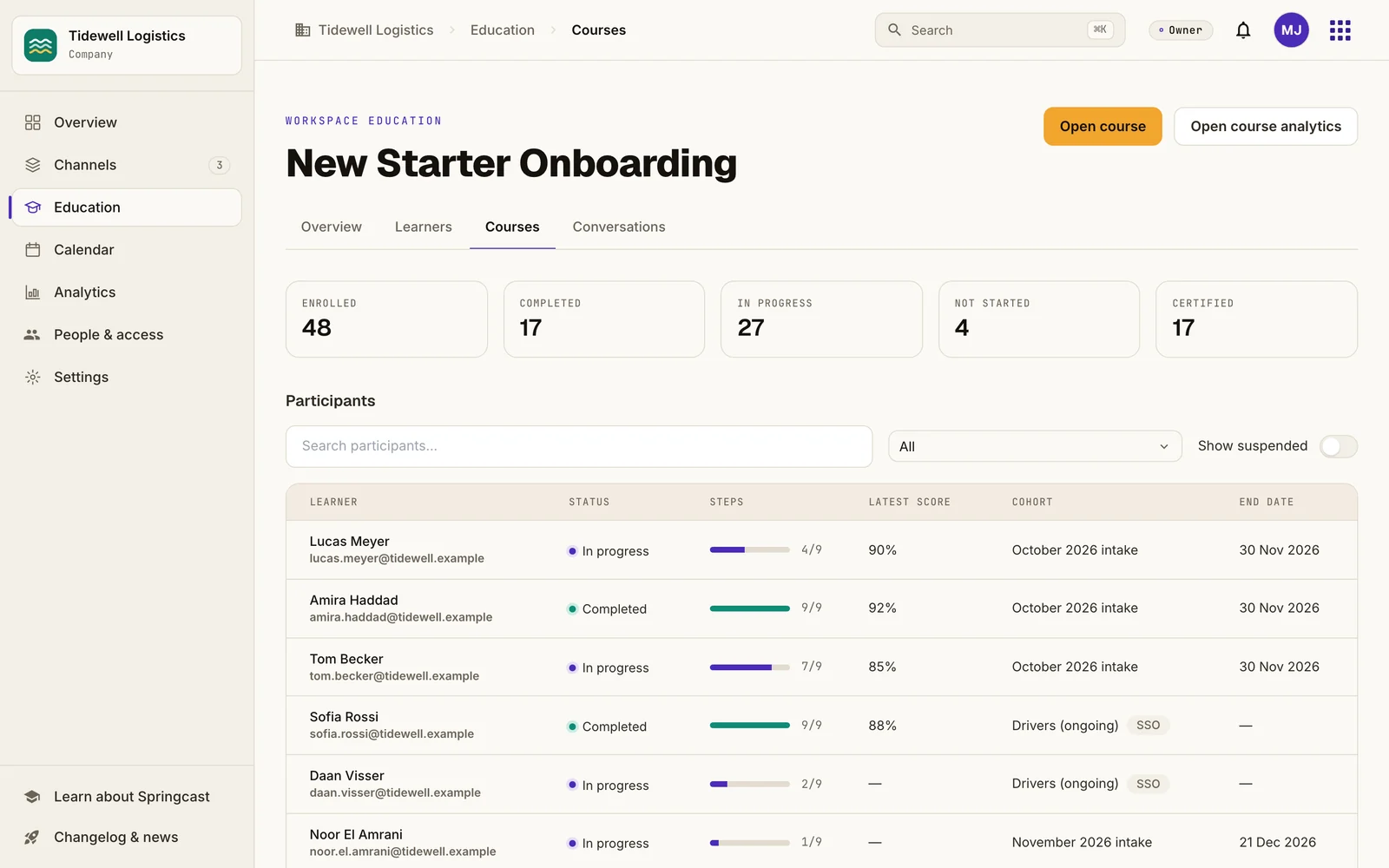
Per course and cohort, you see who is enrolled, who is in progress or has completed, and each learner's steps and latest score.

A lesson with audio or video counts as complete at the percentage you set. That percentage reflects the playback position, so skipping ahead can also reach the threshold. It does not measure listening time, attention or understanding.

02

Test results

You set the pass mark and the number of attempts per test. For each attempt, you can open the learner's answers and the result.

A passed test shows that someone answered these questions correctly at that moment. It does not prove a learning effect or a faster onboarding.

Overview of the course New Starter Onboarding in Springcast: 48 enrolled, 17 completed, 27 in progress, 4 not started and 17 certified, with each learner's steps, latest score and cohort (example data)
Example data

One learner, several courses

A learner exists once in your workspace and can follow several courses, each with its own cohort and coach.

Certificates

When certificates are on, completing a course generates a numbered PDF certificate.

Not yet in reporting

Managers who see only their own team, a full historical training record and scheduled reports are planned for Q1 2027.

Your current LMS

Your main LMS, or next to the one you have

You can use Springcast LMS in two ways: as the learning environment for onboarding and job training, or next to an existing LMS that stays the official record, for the practical knowledge of your own experts. Your requirements decide which route fits.

A

Springcast LMS as your learning environment

A good fit when:

  • your onboarding and job training are built from your own explanations, as audio, video or text
  • employees learn on their phone, often away from a desk
  • you need courses, learning paths, tests, certificates, coach conversations and progress overviews in one place

B

Next to your current LMS

A good fit when:

  • your current LMS stays the place for formal courses and the training record
  • you want your own experts' knowledge available as audio and video that people can play on the go
  • you can work with separate progress data in Springcast for now

A standard integration that exchanges results with another LMS is not confirmed. If your program needs one, raise it in the conversation so it can be assessed separately.

Now and next

What you can use today and what follows

Planned means on the roadmap for Q1 2027 (January to March). Release dates per feature are not fixed yet.

What you needCurrent scope
Available
Courses with modules and lessons in audio, video and textFor audio and video: completion at the start or at a chosen percentage played
Learning pathsCourses in sequence; enrollment by conditions, by hand or SSO/SCIM
Tests and surveysScore, pass mark, attempts; a test can lock the next step
Cohorts and enrollmentEmail, CSV upload, invite link, SSO groups, or self-enrollment where access and capacity allow
Progress and test resultsPer course, cohort and learner
CertificatesNumbered PDF certificate when a course is completed
Coach conversationsStarted from the course; answered in Springcast
Learning in the mobile app, management on the webApp interface in ten languages
Coming soon
Learning in the browserComing soon
Planned Q1 2027
Automatic training reminders and escalationsNot available yet
Personal completion deadlinesToday: cohort end dates
Recertification and recurring trainingCertificates do not expire automatically yet
Manager access to their own teamNot available yet
Historical training record and scheduled reportsToday: progress and results per course and learner
Support for SCORM, xAPI and cmi5Planned direction; versions and import or export scope still to be specified

Questions

Before you get in touch

How do I get Springcast LMS?

Springcast LMS is available as an add-on to a Company subscription and in Enterprise. The add-on costs €150 per month, excluding VAT, with 100 active learners per subscription year. Extra capacity costs €450 per year for each block of 50 active learners. For Enterprise, ask us about the terms.

Who counts as an active learner?

Someone who deliberately starts or resumes a lesson in a learning track they have not finished. Each person counts once per subscription year, however many courses they follow. An invitation, logging in or listening to a podcast does not count. The subscription year runs with your Company subscription: twelve months from its start date. If you add the LMS partway through, the first year runs until your next Company renewal date.

Can employees learn in a browser?

Not yet. Learners use the Springcast app; you manage courses on the web. Learning in the browser is coming soon.

Does completion show that someone listened?

No. For audio and video, completion follows the playback position you set as a threshold. Use tests when you want to check knowledge.

Is the certificate an accredited diploma?

No. It is a numbered Springcast course certificate for completing your course. It has no external accreditation.

What happens after I get in touch?

You send a short request through our contact page and tell us which program you want to run. We then contact you to talk through your content, your learners and your requirements, including the items planned for Q1 2027.
Bring one program you want to run

Tell us which onboarding or training you want to build, who follows it and what you need to see. Together we look at whether Springcast LMS fits as your learning environment, next to your current LMS, or after the Q1 2027 additions.

Looking for the frontline onboarding story? See how a course works for new starters.