No single internal communication channel reaches everyone. Email and the intranet work best for people who have a work login and a screen. For frontline and deskless employees, look for channels that work on their own phone, in their own time, or from person to person.
Below are five questions to test any channel, twelve channels compared on those questions, and example mixes per employee group. If your review ends without a new channel, that is a valid outcome. For what internal communication covers, start with what internal communication is.
Five questions to test any channel
A fixed set of questions makes channels comparable and shows which groups drop out.
Does it need a company account or email address? Every required login can exclude someone: temps, seasonal staff, people who never got a mailbox.
Which device does it run on? A work PC, a work phone, the employee's own phone, or no device at all.
Does it reach people across shifts and outside office hours? A message sent at 10 a.m. lands mid-shift for some and during sleep for others.
Can people take it in with busy hands or eyes? Reading needs eyes and often a free hand. Once audio is playing, it leaves both free, though people still need a suitable moment and permission to listen.
What does it cost the comms team to produce and keep up? Count the recurring work: updating, moderating, chasing contributors.
Then ask what kind of message the channel suits: an urgent instruction, reference material, an explanation, or a story.
Three terms keep the answers apart. Access: can someone open the channel at all (an account, a login, a device, being on site)? Delivery: does the message arrive, where and when (an inbox, a screen, a push notification, a briefing)? Reach: does the person see, hear or read it, in time? A delivered message can still go unseen, and an open, a play or a view doesn't yet show understanding.
In the table below, Access answers questions 1 and 2, Delivery and Where reach breaks down answer question 3 and, where it limits reach, question 4, Effort answers question 5, and Best for names the message type.
The channels, compared on those questions
The table below compares the internal communication channels by access, delivery, where reach breaks down, effort, and the type of message each channel suits.
Compare the channels in a table
| Channel | Access | Delivery | Where reach breaks down | Effort | Best for |
|---|---|---|---|---|---|
a company mailbox, usually opened on a work PC or work phone. | immediate, to the inbox. | reading depends on when and whether people check their inbox, and on how full it is. Staff who work at a laptop all day are more likely to see it in time; people who only check at a shared terminal see news at their next check. | low per message; the cost sits in list upkeep and a crowded inbox. | formal announcements that need a written record, and anything people must find or forward later. | |
| Intranet (e.g. SharePoint) | a company account, a screen, and sometimes a managed device or the company network. | news waits on a page until someone visits. | as a news channel it depends on visits, and staff without a desk are less likely to visit during the working day, so news there often goes unseen by them. | medium to high: page ownership, structure, regular cleanup. | reference material that must be findable: policies, forms, procedures, contact lists. |
| Newsletter | usually an email address; a printed edition needs none. | to the inbox on a fixed schedule, or as a printed copy in the canteen or by post. | people who skim subject lines, and time-sensitive news, which can be out of date by the next edition. | medium: an editor with a fixed slot and input to chase. | a round-up of what changed and why, and recognition for teams rarely seen elsewhere. |
| Chat (Teams, Slack) | an account in the company's chat workspace and the app on a work or personal device. | immediate, in the channel, plus a notification where the app is installed and notifications are on. | teams that work in it all day are likely to see posts. Announcements in busy channels can scroll away within hours. | low to post, high to keep orderly: sprawl, moderation, deciding which channel is official. | coordination inside a team and quick questions. On its own, a weak route for company-wide news. |
| Employee app | an account and an installed app, on a work phone or the employee's own phone. Whether people without a company mailbox can log in depends on the app. Some people won't put a work app on a personal phone, and some never receive login details. | to the app's feed, and as a push notification where that is set up and allowed. | news waits until people open the app, so reach depends on how often they do, for example on a break. | medium to high: a steady content feed, user administration, a rollout plan. | a mobile home for news and documents where a large share of staff works without a desk. |
| SMS and WhatsApp | a current phone number; for WhatsApp, also an account in a consumer app. Personal numbers and a consumer app for work messages call for clear agreements with employees. | usually within minutes, if the number is current and the employee has agreed to receive work messages on it. | missing or outdated numbers, people who opt out, phones that are off or not allowed on the work floor, messages that land in free time, and long messages that get skipped. | low per message, rising as you maintain numbers and groups by hand. | short, time-critical alerts: a site closure, a roster change, a deadline. |
| Digital signage | being on site. Nothing from the employee. | on screens at entrances, canteens, break rooms and production halls, often in a rotation. | only people who pass and look at that moment see it, and a rotating message may be off screen when they walk by. Drivers and field staff seldom pass, and people read a screen in seconds, so detail gets lost. | medium: hardware, a content schedule, someone who removes stale slides. | short reminders, on-site safety messages, pointers to more information. More in digital signage for internal communication. |
| Manager briefings and shift huddles | being present. No login or device. | in person at shift start, from a team lead with the right information, with room for questions. | it reaches whoever attends that briefing. People on leave, late arrivals and other shifts depend on someone passing it on, and each retelling shifts the message a little. | low for comms, real for managers, who need a briefing pack and preparation time. | instructions that need context, and changes where people ask what it means for them. |
| Town halls | being free at that hour, on site or by livestream; remote viewing takes a device and often an account. | live, at a set time. | night and weekend shifts, people on the road, and anyone who can't step away are less likely to attend. | high: preparation, logistics, leadership time. | strategy, major change, and open questions to leadership a few times a year. Leadership's tone comes across in a way text rarely carries. |
| Notice boards and print | being on site. No login or device. | at one physical spot, kept current by someone. | only people who pass the board and stop to read it at that moment. Field staff and drivers seldom pass, and a board where nobody stops goes unread. | low per item, plus taking down outdated sheets. | statutory notices, rosters, contact details, and instructions that belong at one location. |
| Video | a screen, sound or subtitles, and a route to the host: intranet, app or signage. If that route needs an account someone lacks, they can't open it. | wherever it is hosted or shown. | people need a moment to watch, with their eyes free from their work. | high per produced minute; short phone clips cost far less. | demonstrating a procedure, showing a site, putting a face to a leader. |
| Internal podcast | a phone and a way in. With an app that means an invitation and a login; whether people without a company mailbox can join depends on that login. | a new episode waits in the app; people hear about it if they follow the show and have notifications on. | people listen at a moment they choose (a break, the commute, an evening at home), which is too late for anything needed right now. Audio alone leaves out employees who are deaf or hard of hearing, so offer the same content in text. People who aren't allowed to listen while working can only listen away from their tasks. | medium: a recurring format, a host, a recording routine. | explanation, background to change, leadership in their own voice, stories from colleagues. |
Why the gaps are structural
The gaps above follow from how work is organized. Eurostat data indicates how many people they can affect.
In 2025, 64.6% of persons employed in EU enterprises with ten or more persons employed had internet access for business purposes. The survey behind the figure leaves out, among others, agriculture, forestry, fishing, mining, the financial sector, public administration, education, and health and social care (Eurostat, isoc_ci_cm_pn2). That leaves about a third without it. The indicator measures access to the internet for business purposes; it doesn't measure company email, or whether someone uses their own phone. Our inference: channels that assume work internet access or a work device, such as email on a work PC or an intranet on the company network, are harder for this group to open during work. Harder doesn't mean impossible: some read on their own phone or outside working hours.
Timing is the second gap. In 2025, 17.4% of employees aged 15 to 64 in the EU worked shifts (Eurostat, lfsa_ewpshi). Among employed service and sales workers, 47.6% usually worked on weekends (Eurostat news release, May 2026). For many in these groups, messages timed for weekday office hours arrive mid-shift or in their free time. Whether they are seen then depends on the channel and on what you have agreed with them.
Example mixes per group
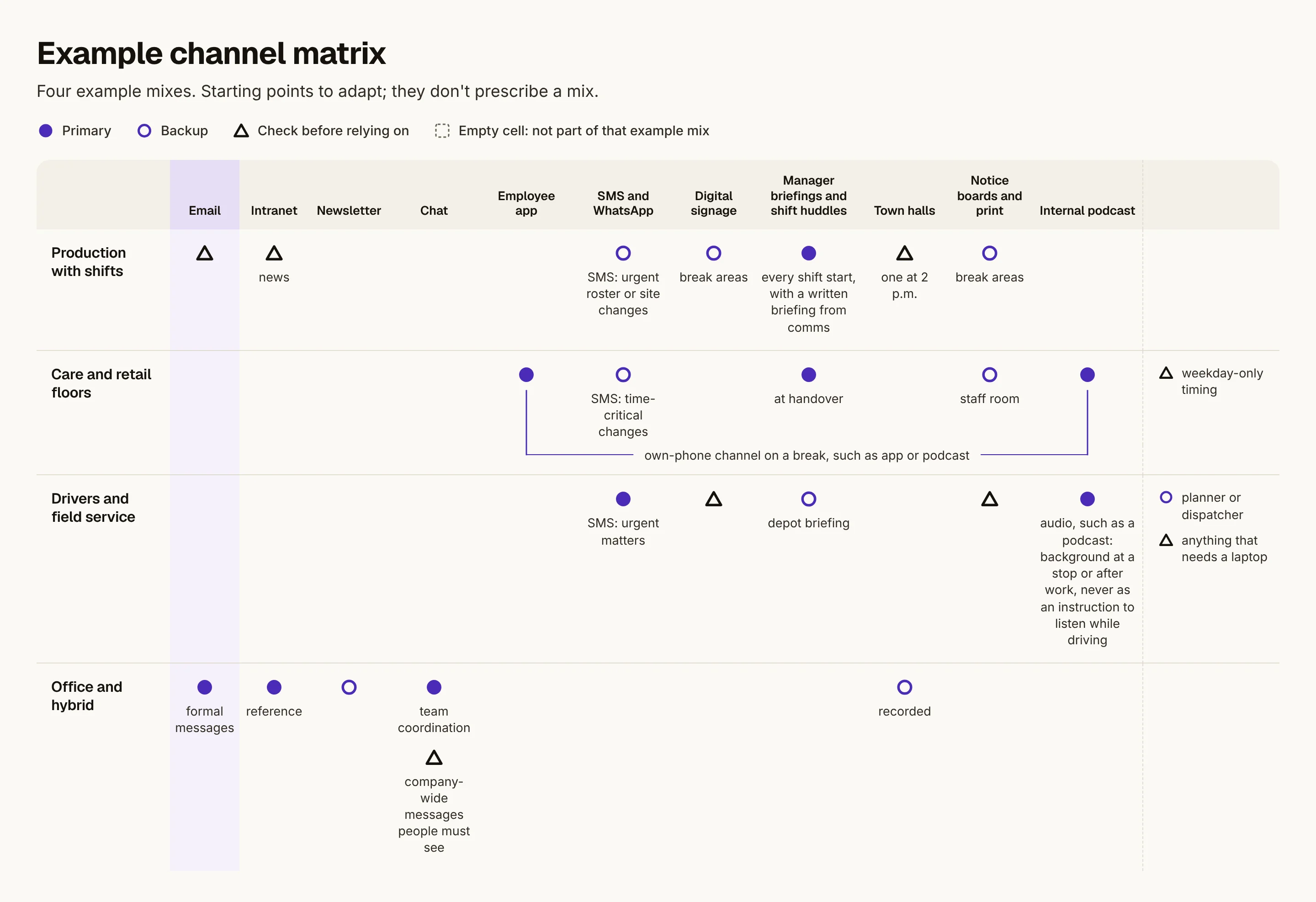
Start from groups, then choose channels. The four mixes below are starting points to adapt, and they don't prescribe a mix. What fits depends on site rules (such as whether phones are allowed on the floor), devices, languages, agreements with your works council, and what already works. Each example names a possible primary channel and backup, the manager's role, and what to check before relying on it. Pilot setup, works council involvement, driving safety and onboarding without company email are covered in our guide to reaching deskless workers.
Production with shifts
Primary: a huddle at the start of every shift, with a short written briefing from comms so each shift hears the same message.
Backup: signage and boards in break areas; SMS for urgent roster or site changes.
Manager's role: brief every shift, nights included, and report back which questions came up.
Check before relying on: email, intranet news, or one town hall at 2 p.m.
Care and retail floors
Primary: the team lead's briefing at handover, plus a channel on the employee's own phone for background on a break, such as an employee app or an internal podcast.
Backup: the staff-room board, and SMS alerts for time-critical changes.
Manager's role: protect a few minutes at handover and point people to the background channel.
Check before relying on: weekday-only timing. Plan how weekend staff hear news in their own week.
Drivers and field service
Primary: the phone. Short SMS alerts for urgent matters; audio, such as an internal podcast, for background at a stop or after work, never as an instruction to listen while driving.
Backup: the planner or dispatcher, and a depot briefing when people come in.
Manager's role: keep dispatch informed so they can answer questions.
Check before relying on: signage, notice boards, or anything that needs a laptop.
Office and hybrid
Primary: email for formal messages, the intranet for reference, chat for team coordination. Existing tools often work well here.
Backup: recorded town halls and the newsletter.
Manager's role: turn company news into team priorities.
Check before relying on: chat channels for company-wide messages people must see.
Side by side, the four example mixes form a channel matrix, with groups as rows and channels as columns. Read down a column to see one channel play different roles: in these examples, email is primary for office staff and something to check before relying on in production.
Open the full-size matrix
Where an internal podcast fits, and where it doesn't
An internal podcast suits messages that need explanation and a human voice: why a decision was made, what a reorganization means, how a team solved a problem. People take it in on their own phone at their own moment, which fits groups that rarely sit at a screen. Podcast listening is already a habit for many: in the UK, 22% of adults aged 15 and over listened to podcasts each week at the start of 2025 (Ofcom, Audio report 2025, citing RAJAR).
It doesn't fit urgent operational instructions or safety notices. Those need a channel that arrives at once, such as a huddle, a text alert or a sign where the risk is, often backed by a written record. Never ask people to listen while driving or operating machinery.
Some employees can't use audio at all, or can't use it at work. Employees who are deaf or hard of hearing need the same content in text; Springcast Mobile can show a transcript in the episode's language. Others aren't allowed to listen during their work, because of safety rules, hearing protection, a phone ban or customer contact. For them, listening belongs away from their tasks, on a break or at an agreed moment. If you expect people to listen, agree when that can happen in working time; our guide to reaching deskless workers covers this. Anything everyone must know needs a version that isn't audio.
Two limits shape any rollout. For people without a company mailbox, the access route has to work without one. And in Springcast Mobile, a push notification for a new episode goes only to people who follow the show and have notifications turned on. Notifications are off by default. So let managers help people follow the show and switch on notifications during a huddle.
How this works in Springcast
Springcast Mobile is an internal podcast app, available in the App Store and Google Play. Access is invite-only, with audio and video episodes. You link groups to shows, and group membership sets who sees which content: one show for a site, another for all staff.
Logging in starts with an email address, and that may be a private address, so employees without a company mailbox can get access. Single sign-on through your identity provider is an option. Listeners can follow a transcript in the episode's language, play at 1x, 1.25x, 1.5x or 2x speed, and skip 10 seconds back or 30 seconds forward. The interface is available in ten languages (English, Dutch, German, Danish, Spanish, French, Italian, Polish, Portuguese, Swedish); episode content is not translated.
There is no price per regular mobile listener and no listener limit. Springcast Mobile is included in the Company and Enterprise plans; Company Light does not include it. On Company, single sign-on is a one-time paid option; on Enterprise it is included. Our applications run in the Netherlands, Germany and Finland.
You see listening behavior and interactions in aggregate. Insight per person is not yet available for regular internal podcasts; it exists in the separate onboarding and training module, an add-on on Company and also available in Enterprise, with courses in the mobile app. More on the product: internal podcast.
Check whether a channel reaches people
Put groups next to channels. List your groups as rows and channels as columns, as in the example matrix under Example mixes per group. Mark which channels each group can open without help, then choose a primary channel and a backup. A row without a workable primary channel is a gap.
Ask managers who didn't see it. After an important message, ask team leads who missed it and why: no login, wrong shift, no device.
Measure what can be measured. Deliveries show that a message arrived; opens, plays, views and attendance indicate reach. None of them proves understanding, so test that with a question in the next huddle.
Comparing platforms for audio? Use the internal podcast platform requirements checklist.
Frequently asked questions
What is the most effective internal communication channel?
In a mixed workforce, no single channel works for every group. A channel is effective for a group when people can open it with the login and device they have, and the message reaches them at a time they are free to see, hear or read it. For office staff that is often email; for shift and field staff, often a manager briefing combined with something on their own phone.
How do you reach employees who don't have a company email address?
For frontline employees without a company mailbox, use channels that need none: manager briefings, on-site signage and notice boards, text alerts for urgent matters, and a mobile app whose login accepts a private email address. Agree on privacy for personal phones and numbers with your works council or data protection officer first.
What is an internal communication channel matrix?
A grid with employee groups as rows and channels as columns. Each cell records whether that group can open that channel and what you use it for. It shows which groups lack a workable primary channel and which channels nobody owns.
Can an internal podcast replace email or the intranet?
No. Email keeps a written record and the intranet holds reference material people need to find again; a podcast does neither. It adds a channel for explanation and voice on people's own phones, which suits the groups email and the intranet often miss.
Sources
Eurostat, "Employees working shifts, % of total employees" (dataset lfsa_ewpshi), updated September 10, 2026. https://ec.europa.eu/eurostat/databrowser/view/lfsa_ewpshi/default/table
Eurostat, "21% of employed people worked on weekends in 2025" (news release), May 1, 2026. https://ec.europa.eu/eurostat/web/products-eurostat-news/w/ddn-20260501-1
Eurostat, "Use of computers and the internet by employees by NACE Rev. 2 activity" (dataset isoc_ci_cm_pn2), indicator "Persons employed have access to the internet for business purposes", enterprises with 10 or more persons employed, updated June 15, 2026. https://ec.europa.eu/eurostat/databrowser/view/isoc_ci_cm_pn2/default/table
Ofcom, Audio report 2025 (weekly podcast reach from RAJAR, adults 15+), May 21, 2025. https://www.ofcom.org.uk/siteassets/resources/documents/research-and-data/data/statistics/2025/audio-report-2025/audio-report-2025.pdf