
If your podcast has video, the episode probably leaves the building twice. The audio goes to the podcast host, the video goes to YouTube, each with its own upload and its own form. On Friday you open two dashboards, copy a download count from one and a view count from the other, and paste both into the same slide. They count different things, and the slide gets a total anyway, because someone asked for one number.
Then a second question arrives, usually from a DPO, an IT colleague or a vendor questionnaire: where is the video hosted? Teams that want to keep their video in the EU for GDPR reasons need that answer before a video goes on the website, and it is a question we hear more often.
Video hosting in Springcast, live since September 15, is built for both. Springcast now hosts video natively, next to a full YouTube integration, and you choose per video where it goes. That works for a video podcast, and for any other video you want on your own website.
This deep dive follows one episode through the week: the upload, the choice between Springcast and YouTube, the player on your site and the Friday report. Then one section for the case where the audience is your colleagues. What you see depends on your plan.
All screenshots show a demo show. Your own screens will look different.
Two uploads and a report that does not add up
Here is the week as it runs today. Monday, the edit is done. The audio goes to the host, the video goes to YouTube, and you write the description twice because the two forms ask for different things. Wednesday, a colleague asks where the episode is, and the answer depends on whether they want to listen or watch.
Friday is the report. The host counts downloads; YouTube counts views, by its own definition, on its own calendar, with its own idea of what a viewer is. You can put the two in one table. You cannot add them up, and everyone who reads the table quietly does.
There is a quieter cost. When every video lives on YouTube, your own website gets an embed: someone else's player on your page, someone else's recommendations when the video ends, and a cookie question in front of it. Your episode, the one thing in this process that is fully yours, plays inside somebody else's player.
Hosted in Springcast or published to YouTube: your choice per video
Every video gets one of two homes, and you pick it on the episode.
- Hosted in Springcast. The video sits on the episode next to the audio, plays in your own player on your own website, and can go into the internal podcast app.
- Published to YouTube. You publish it from the episode's YouTube settings, inside Springcast. The video is then on YouTube only: it plays on YouTube, and it does not go into the app.
Which one fits depends on who needs to see the video. A video podcast that should be found by people searching on YouTube belongs there. Other video is often something you would rather keep on your own site and in your own player.
For hosted video, the video hosting page answers the hosting question in one line: "EU-hosted streaming: Delivered from EU infrastructure (Scaleway)". It is about video you host in Springcast; a video you publish to YouTube lives on YouTube.
The video belongs to the episode, so you upload it once
In Springcast, video is part of the episode. You open the episode, the audio is already there, and you add the video next to it. For a hosted video, Springcast prepares the streaming versions from that one file. Your audio keeps going out to 15+ platforms through the feed, the way it does today.
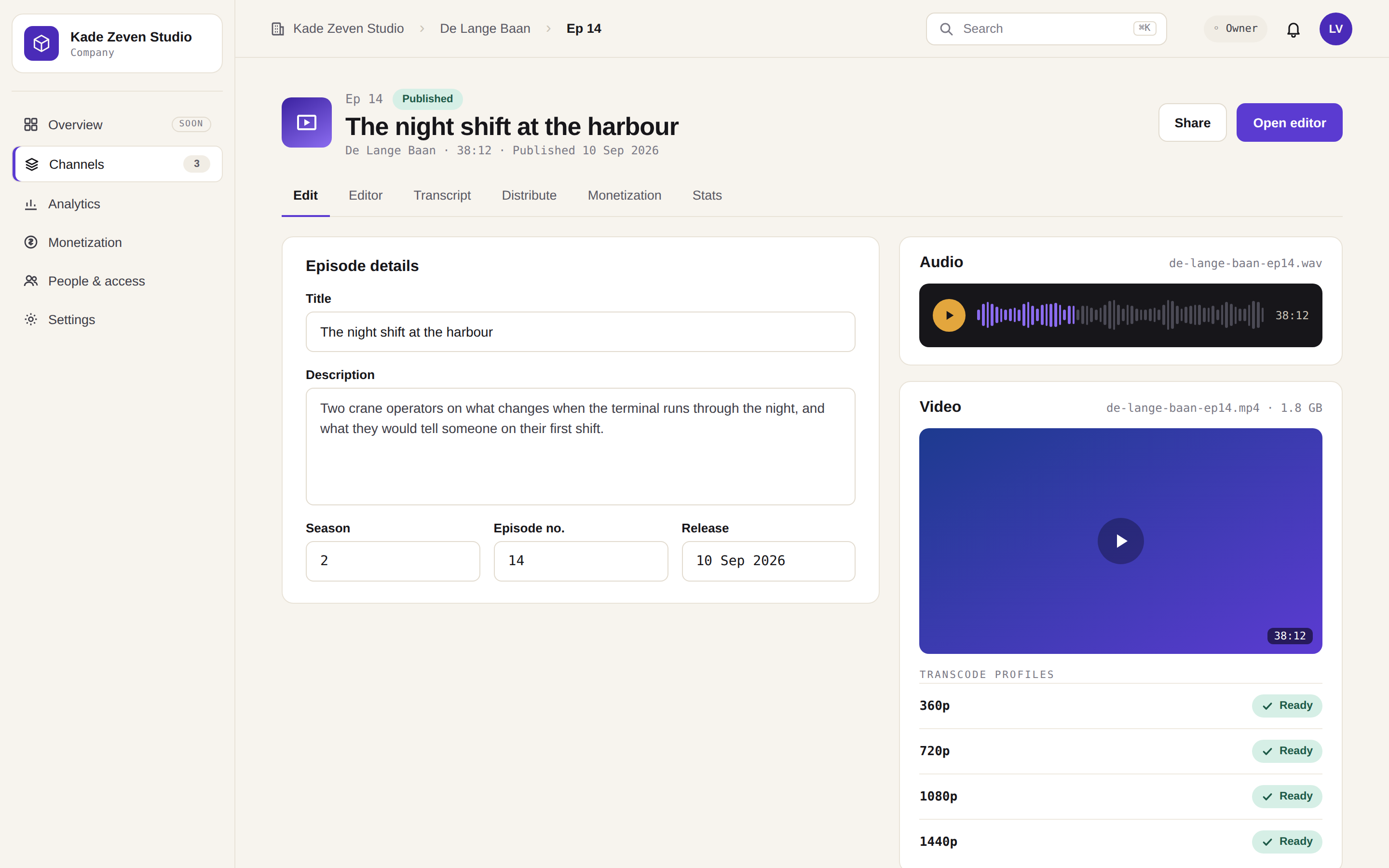
What changes on Monday is the number of places you have to be. The video sits on the episode, and so does the choice between Springcast and YouTube. The second tab is gone.
Your own player, on your own website
A hosted video plays in the Springcast player, in your branding. On the podcast website that comes with your show, a visitor can switch between audio and video on the episode page, or open theater mode and watch it large. When the video ends, it ends. No recommendation for another channel, and no cookies that require consent.
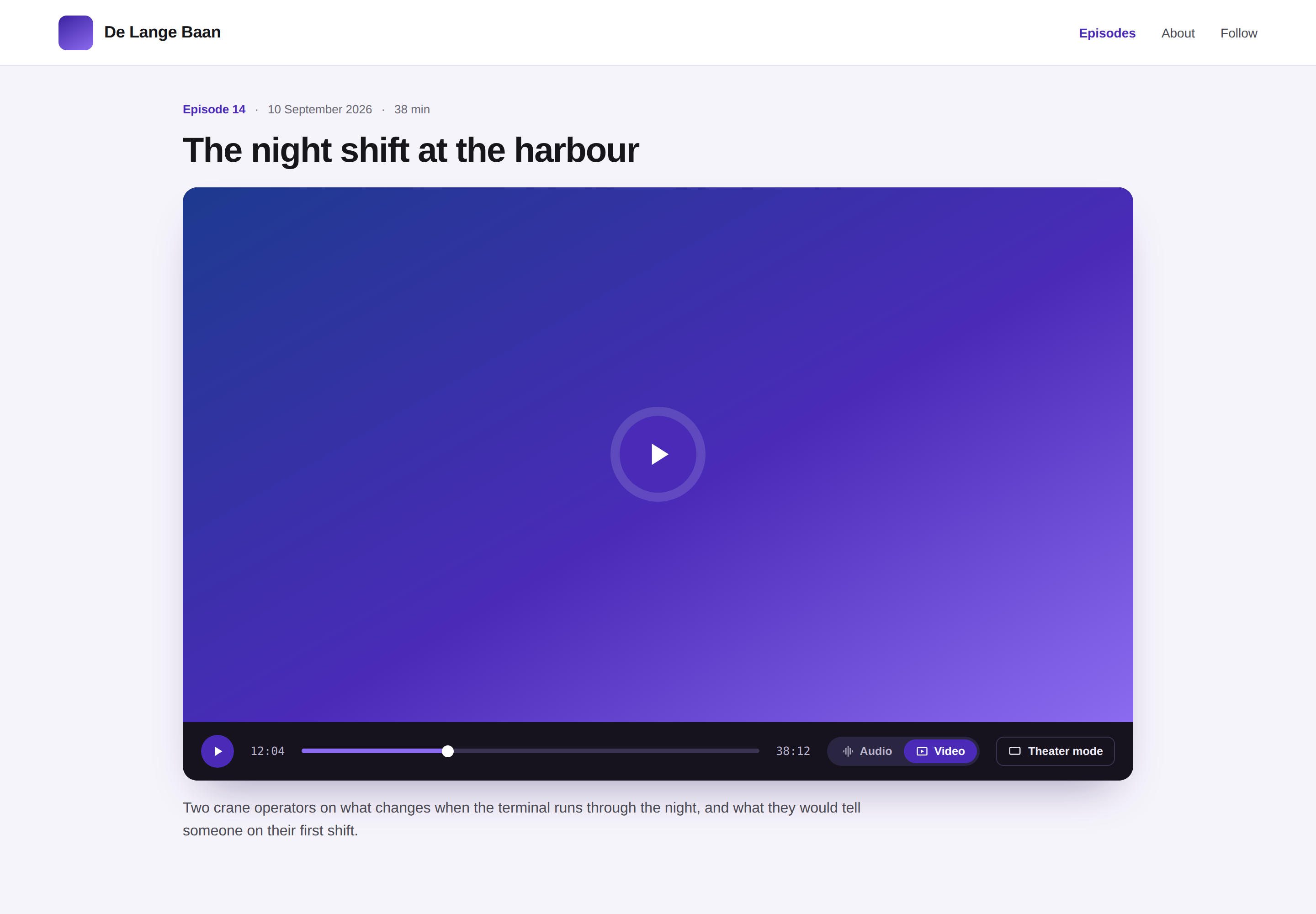
A vodcast is one use. Video that has nothing to do with a podcast plays in the same player, on your own website.
If your site belongs to a public body, the embed itself is the compliance problem: cookie consent, sovereignty policy and accessibility rules all point at the player. We wrote that up in Video hosting for the public sector: why YouTube no longer cuts it. On a company site the paperwork is lighter; the player question is the same.
When YouTube is the right home for the video
YouTube stays. Part of your audience searches there and will never open a podcast app, and a video podcast belongs where those people look. For those videos you choose YouTube in the episode's YouTube settings, inside Springcast, and publish from there. No second upload, no second tab open on a Monday morning. The video then lives on YouTube only, with YouTube's reach and YouTube's player.
The production side has its own guide: why a podcast belongs on YouTube at all, how much video is enough, and how to record once, in landscape, and export for both. That is Video podcasting and YouTube: one recording, multiple outputs. This article picks up where it stops, at the moment the file is ready.
If you cut Shorts from the episode, their numbers come back too, through social analytics on Scale.
One screen for the numbers, one line per platform
The Friday after looks like this. You open the show, one tab. The video tab in Analytics shows the plays in your own player for the videos you host in Springcast, and the views on YouTube for the videos you published there, split per platform, on the same dates; what you see depends on your plan. For your own player, you also see completion and the engagement events, so you know how far people watch.
Audio and video sit in the same view. A show that runs in both formats gets its figures on one calendar, each platform on its own line, instead of two dashboards that were never going to agree. The downloads are filtered for bots, so the number on the slide is a number you can defend.
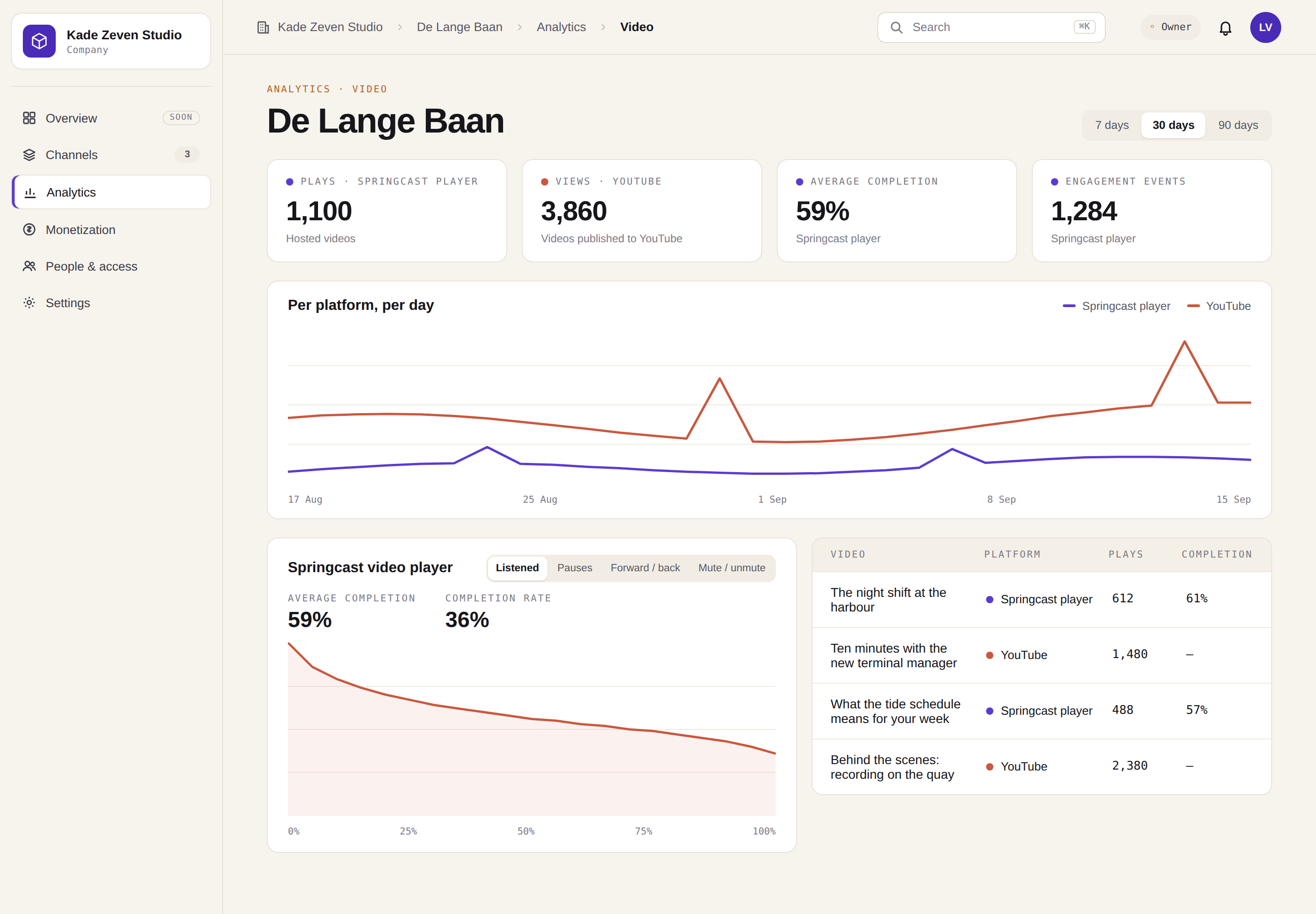
The slide gets one line per platform instead of a sum: plays in your player, views on YouTube, and how much of the hosted video people watched. It is less tidy than one total, and it holds up when someone asks what the number means.
When the audience is your colleagues: video in the internal podcast app
The other place company video ends up is SharePoint. The town hall recording, the onboarding walkthrough, the quarterly update from the board: uploaded, linked in an email, watched by whoever opened that email that day. Nobody reports on who watched, and the colleagues without a desk and a company mailbox never saw the link.
The internal podcast app is the other route for the same episode, as long as its video is hosted in Springcast. A video published to YouTube stays on YouTube and does not go into the app. The app is invite-only, and groups are linked to shows, so the right people see the right episodes. New episodes reach the colleagues who follow the show with a push notification, and single sign-on is an option. A hosted video goes into the app with its episode, and a colleague can switch between audio and video without losing their place.
Plays in the app come back into the same analytics as the plays on your site. The internal podcast app is set up on request for Company and Enterprise. The first step is a conversation.
Somewhere in that conversation, a DPO or an IT colleague asks where the video is hosted. For hosted video, the video hosting page puts it this way: "EU-hosted streaming: Delivered from EU infrastructure (Scaleway)".
Which plan includes what
As of September 2026:
- Essential has no video.
- Professional and Scale have native video hosting and the YouTube integration. Social analytics, where YouTube Shorts performance shows up, is part of Scale.
- Company Light, Company and Enterprise have native video hosting too. The internal podcast app is set up on request for Company and Enterprise.
If you already use Springcast
On Professional or Scale: log in, open an episode and add the video next to the audio. Then choose where it goes: hosted in Springcast, or published to YouTube from the episode's YouTube settings. Publish the way you always do.
On Essential: video starts at Professional, and the pricing page shows what else comes with that step.
If you are new here
Start a trial on Professional or Scale and put your own episode in it, audio and video. Fourteen days, no credit card. Host one video in Springcast, publish the next one to YouTube, and see which home suits which video.
If your audience is your colleagues
Talk to us and bring the video that lives in SharePoint today. We will walk through where it would live instead, who would see it, and what the report looks like afterwards.