
Six releases went live in Springcast this morning. A completely new design, Analytics 3.5, dynamic content insertion, an MCP connection for AI agents, video hosting on European servers, and a private podcast app for organizations. All of it is in the product today. No beta, no waitlist.
That makes it the biggest release in Springcast's history. Starting tomorrow we publish an article a day, one feature at a time, through October 2. Today, all six at once.
1. A completely new Springcast
We redesigned the application from the ground up. Everything you do in a normal week is closer to hand: adding an episode to the schedule, checking how the last one landed. You will recognize where things live. Getting to them takes fewer steps.
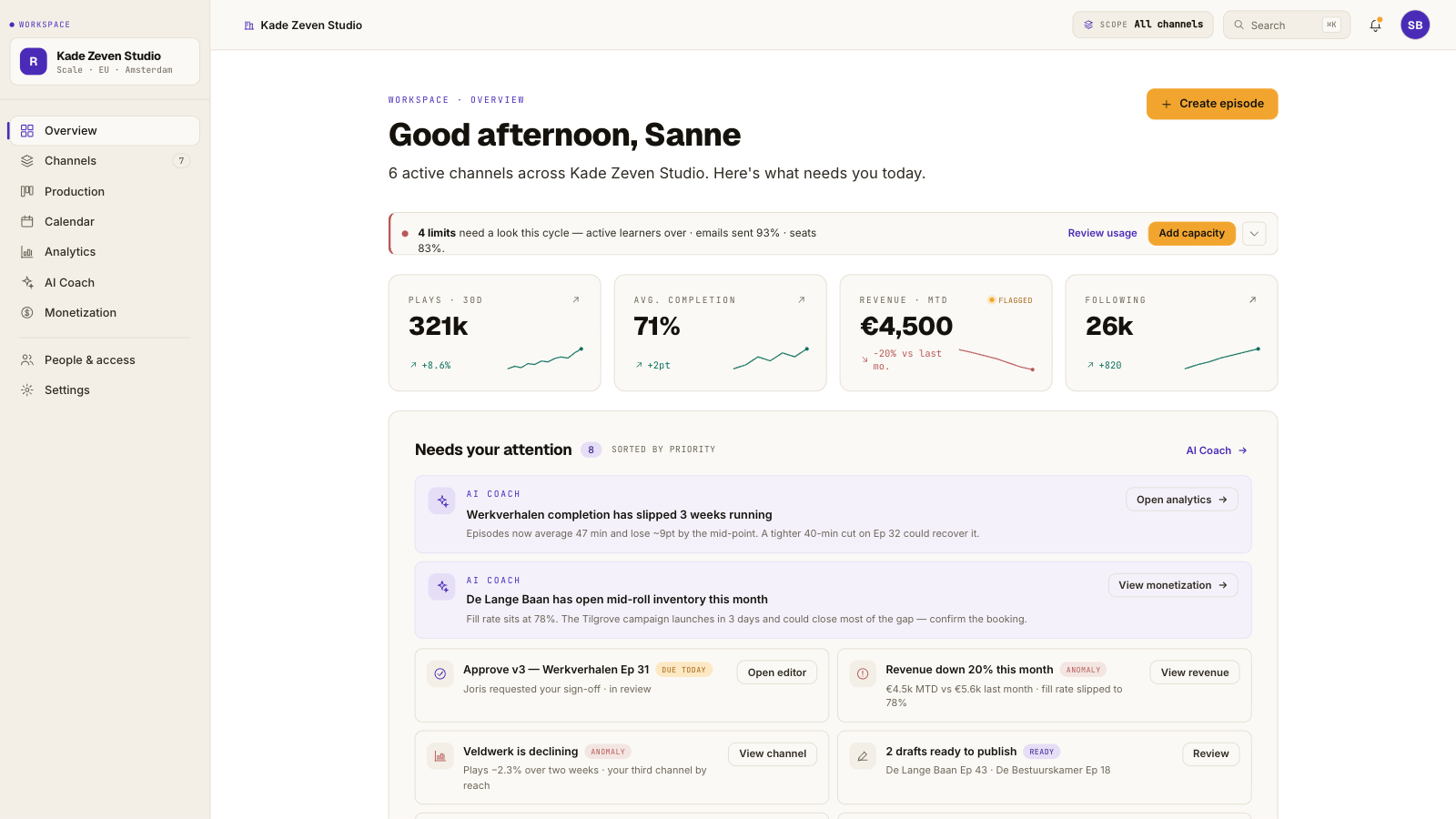
The change goes deeper than the layout. We rebuilt what runs underneath the interface, and screens load faster as a result. You notice it most in the screens you open every day, like your episode list and your analytics.
The palette is warmer than it was. That sounds cosmetic until you have spent an afternoon in the editor, which plenty of our customers do. And that is where most of this came from: we went through the feedback of people who work in Springcast every day, and started with whatever they told us was in the way. If something you use constantly now takes fewer clicks, that is why.
The redesign is groundwork too. The other five releases sit inside it, and so will the ones we have not announced yet.
2. Analytics 3.5, including your reach off the feed
Every customer conversation ends up in the same place. Analytics matters more to podcast makers than anything else in the product. Analytics 3.5 shows listening behavior down to completion, and the skip and pause patterns that tell you where an episode loses people.
The new part is social analytics. Your show also runs on LinkedIn, on Instagram and Facebook, and in YouTube Shorts, and until today that meant four dashboards to work out what it was worth. That reach now sits in the same view as your listening numbers, on the same dates. You can see which clip pulled the listeners your audio numbers show.
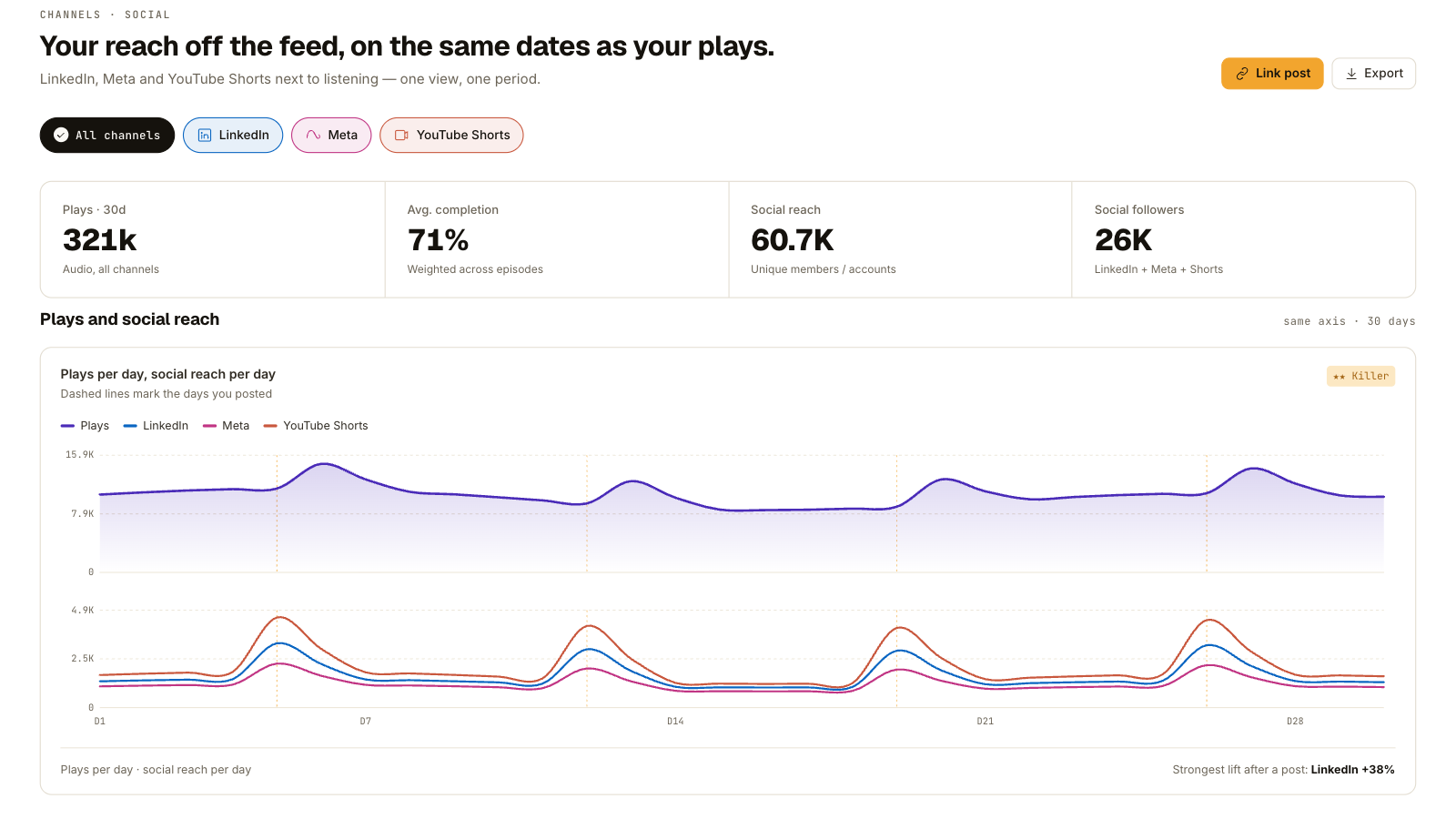
Two details underneath it carry more weight than they sound like. The numbers are bot-free, so what you report to a sponsor is what a person listened to. Audio and video sit in one view, so a show that runs in both formats has one set of figures instead of two that never quite agree.
Social analytics is part of pro analytics on Scale. Advanced analytics starts at Professional.
3. Dynamic content insertion
Ads, cross-promos and anything with an expiry date go in and out of your episodes without re-uploading a file. Your back catalog included. An ad that ran in March can be replaced today, in every episode it appeared in, in one action.
For creators, the archive starts earning again instead of sitting still. For publishers, it removes the reason most sponsorship deals stop at the newest ten episodes: you can sell a placement across the catalog and change it when the deal changes. And the cross-promo you set up to launch your second show keeps pointing at the right episode long after you stopped thinking about it.
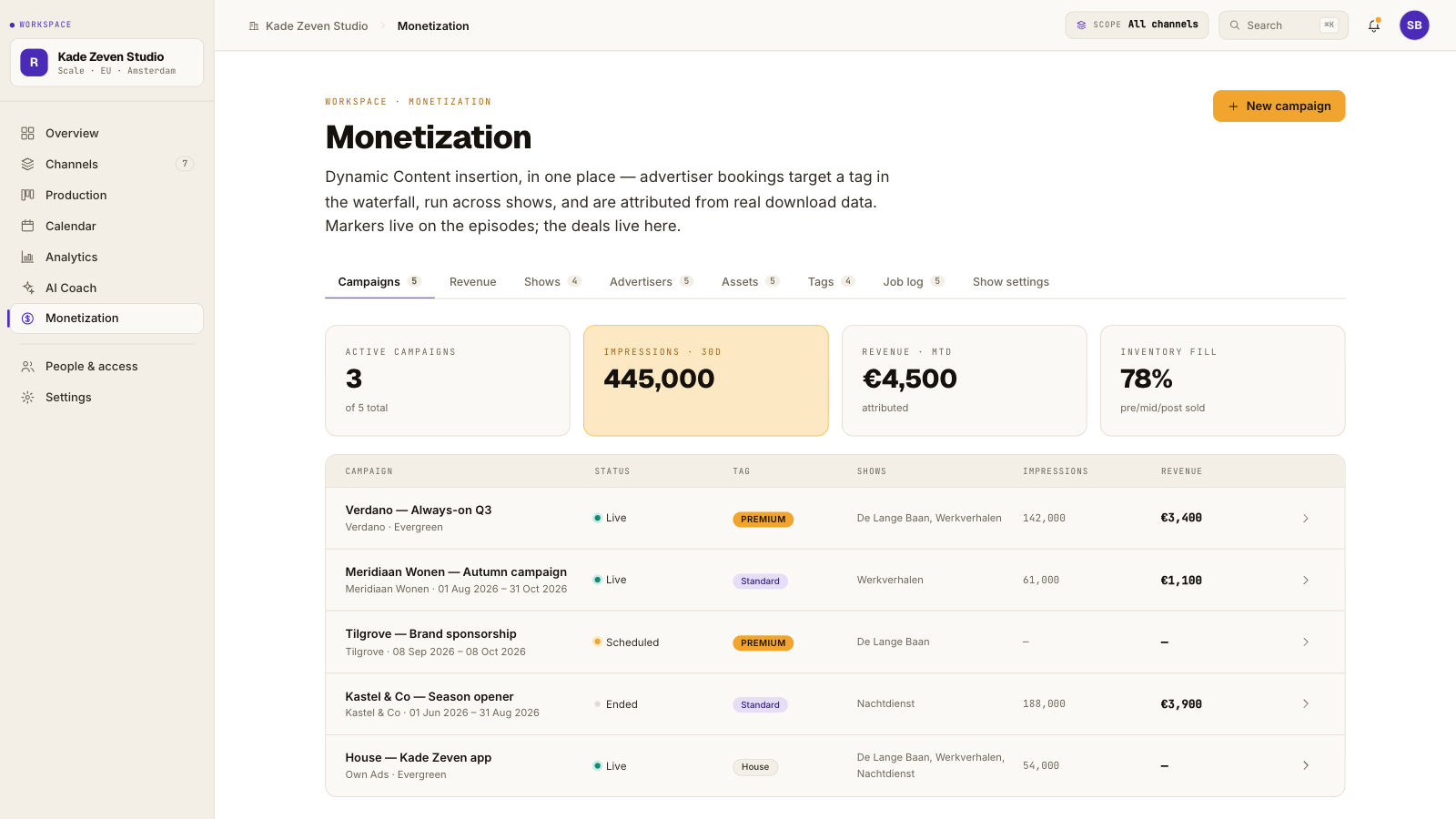
Dynamic content insertion is available in its basic form on Professional and in full on Scale.
4. Springcast MCP: your podcast data, in your AI assistant
Springcast now speaks the Model Context Protocol, through a Content API and an Analytics API. Connect Claude, or any other assistant that supports MCP, and you can ask your own data questions in your own words. Which episode held attention longest last month. Where the drop-off starts.
It works in the other direction too. Your assistant can draft show notes from the transcript, pull a monthly report together, or write a description in the tone you already use. You approve, it publishes through your account. You keep the editorial decisions, the assistant does the retyping.
The MCP connection is a Scale feature.
5. Video hosting, on European servers
Video became part of podcasting without ever becoming easy. Both options were bad: hand everything to YouTube and lose sight of your own numbers, or pay specialist video hosting prices on top of the podcast host you already pay for.
From today you host video with Springcast. It sits on European servers, in the same account and the same workflow as your audio, with your own player on your own site.
Push the same upload to YouTube if that is where your audience is. The YouTube settings are handled from inside Springcast, and Shorts performance is tracked alongside everything else. One upload, and you decide where it lands.
Video hosting starts at Professional, with more storage on Scale. Essential does not include video.
6. A private podcast app for organizations
Internal communication, onboarding and training work well as audio, right up to the moment you have to explain to four hundred colleagues how to subscribe to a password-protected feed. The private podcast app removes that step. Your organization gets its own white-label app with push notifications and engagement analytics, so people open the app they were told to open and the episode is there.
This is a different product from the private podcasts on Professional, which put a password on your podcast website. This is a dedicated app for your organization, built with you, and single sign-on is an option. It is part of Company and Enterprise, not Company Light, and set up on request, so the first step is a conversation rather than a signup.
What this means for your plan
Some of what launched today is in every plan. Some of it sits higher up. The honest version:
- The new design is live on every plan, for everyone.
- Advanced analytics starts at Professional. Social analytics is part of pro analytics on Scale.
- Dynamic content insertion is basic on Professional, complete on Scale.
- The MCP connection is a Scale feature.
- Video hosting starts at Professional and gets more room on Scale. Essential has no video.
- The private podcast app is part of Company and Enterprise, not Company Light, and is set up on request.
If you are on Professional today and you want social analytics, dynamic content in full and the MCP connection, Scale is the step. That is €39 per month instead of the €19 you pay now, excluding VAT, and if you pay monthly you can cancel monthly. Compare the plans →
What did not change
The foundation under those six releases works the way it did yesterday. Your episodes still go out to 15+ platforms in one go. Episodes and downloads are still unlimited on every plan. Your data still lives in the EU, and if you pay monthly you can still cancel monthly.
Nothing needs migrating and nothing needs re-uploading. If you change nothing today, your podcast keeps running.
One feature a day, through October 2
Starting tomorrow, every working day, one article. Each one takes a single feature and works through it in three steps: what it is, a situation where it earns its place, and how to switch it on in your own account. The same order we use internally, because a feature nobody switches on is a feature nobody has.
If you already use Springcast
Log in. Everything above is already in your account, and the new design is the first thing you will see.
If you are new here
Start a trial and put your own show in it. Fourteen days, no credit card, and your data stays in the EU from the first upload.
We would rather hear what breaks than what impresses. Tell us in the app, or reply to the launch email.