
The leadership update is ready. It goes on SharePoint, a mail goes out with the link, and the page views start to come in. Then the question the report does not answer: how many colleagues read it to the end? And how many went to the intranet that week on their own, just to see whether there was anything new?
An internal podcast changes the format. A voice carries more of a message than a memo, and an episode fits a break or the drive between two jobs. It does not change where the episode lives. Put it on the intranet as an mp3 and it waits for the same visitors as every other page, with a few problems of its own on top.
This deep dive follows one episode from your desk to the colleagues it is meant for, in the office and away from it: why the intranet holds it back, how an app gets it heard, what you learn about who listened, and how to start. The parts on access and on where the data lives are for whoever in IT or privacy has to sign off.
All screenshots show a fictional organization with sample data.
Explore all six updates in the late summer release overview.
Why an episode on the intranet goes unheard
The first problem is reach. An intranet is somewhere people have to go. How many of your colleagues open it when they do not need a form or a phone number?
The second is timing. Of the colleagues who do read the intranet, how many check on their own whether something new is up? An episode published on Tuesday waits until someone happens to pass by.
The third is the listening. An mp3 on an intranet page is a poor way to listen in short stretches. And behind an intranet login, it is hard to start in the van, on the shop floor or on the walk to the next building.
The deskless colleague, without a PC or a company mail address, runs into all three at once. The colleague at a desk runs into them too, only less visibly.
What you get back from that mp3 is whatever your intranet happens to count. Whether anyone listened past the first minute is the question you actually want answered.
The episode lands in an app on the phone they already carry
The episode lands in Springcast Mobile, the internal podcast app for organizations, in your own branding. Colleagues install it from the App Store or Google Play; the links to share sit in your admin.
Access is by invitation. You invite a colleague by email address, one by one or as a list, and they sign in with that address. With single sign-on, available as an option, they go straight through your identity provider, without a separate password.
Once inside, the Stream tab is personalized to the groups you placed them in. Two colleagues in different groups see two different streams, so nobody scrolls through shows that were never meant for them.
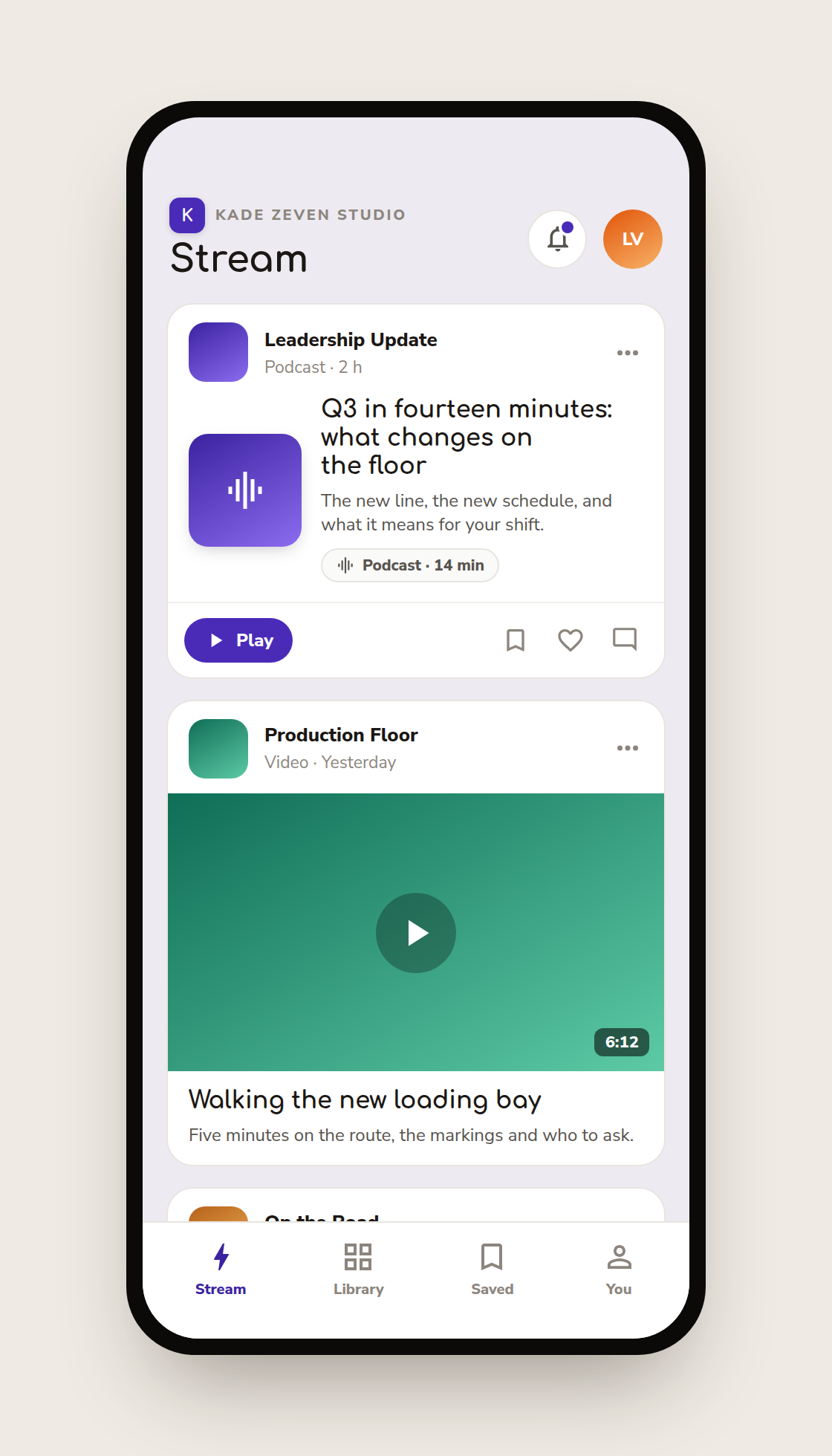
Watching and listening away from the desk
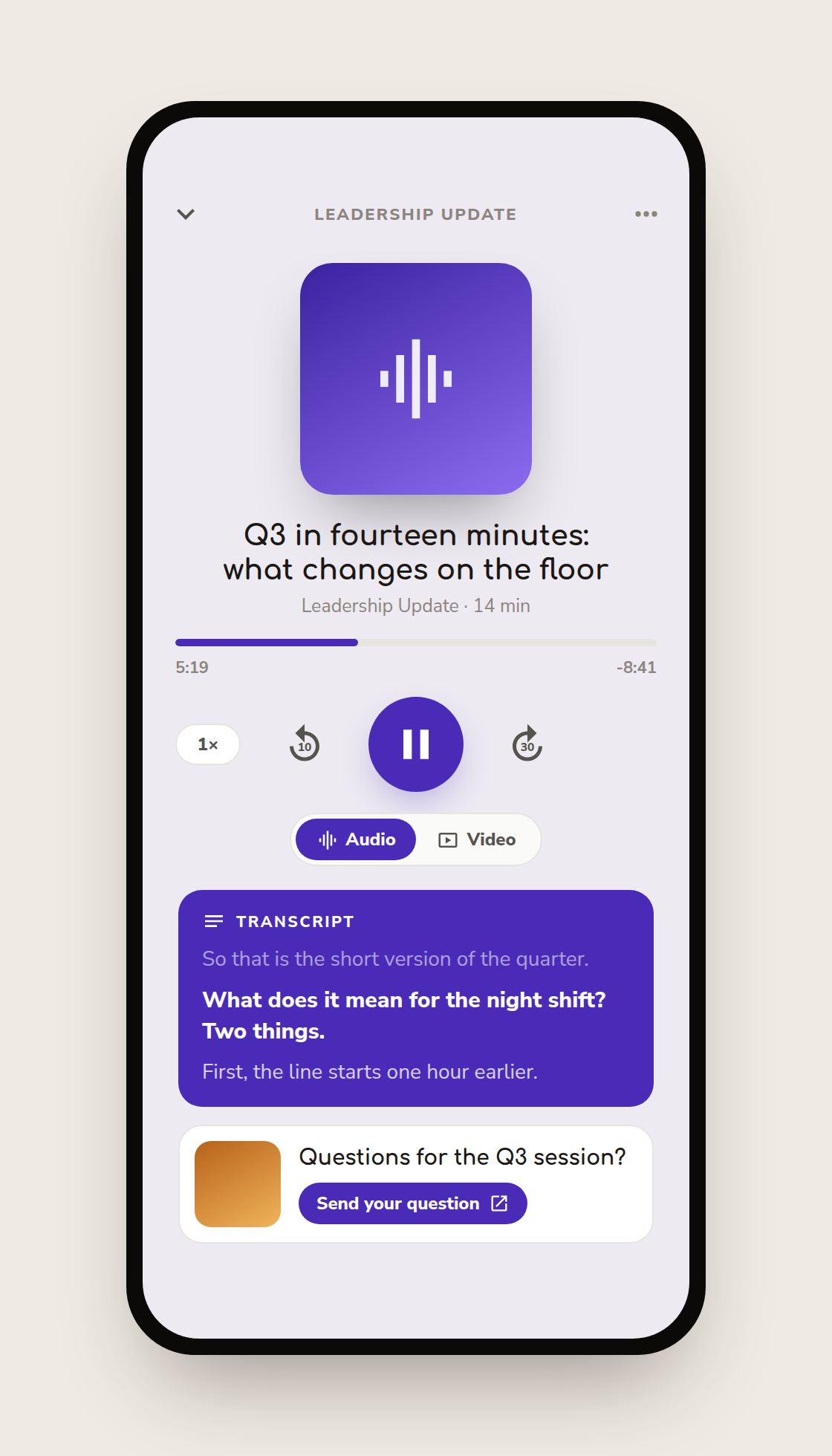
The colleague opens the app on a break or before the next job, opens the new episode and presses Play. The player is made for listening in short stretches: change the speed, skip back ten seconds or ahead thirty, and keep a mini-player at the bottom of the screen while browsing the rest of the app.
The transcript runs along with the audio, in the language of the episode, so a colleague in a quiet room, or one listening in their second language, can read along. You produce the episode once.
Chapters sit on the episode page with a timestamp. Tap one and the player jumps there, so the colleague on the night shift goes straight to the part about the night shift. Plan for that: put the decision early, and give each site or team its own chapter.
If the episode has video, the same player switches between audio and video without losing the second. An episode saved for later is still in Saved when they sign in on another phone. And every episode can carry a call-to-action, set from Springcast Pro: a title, an image and a button, shown at the moment you choose, for the form or the follow-up you want after listening.
New episodes find the colleagues who follow the show
On the intranet, people have to come and look. In the app, a new episode goes to them. The app sends a push notification to the colleagues who follow the show and have notifications on, and the new episode also appears in the notification center inside the app.
At several customers, push notifications multiplied retention: listeners who come back to listen again.
The push has a limit, and it is deliberate. Notifications are off by default: the app asks once, the first time someone opens it, and the choice can be changed later in the profile. Only followers get the push. A notification nobody asked for is the all-staff mail again, on a smaller screen; one from a show someone chose to follow is one they asked for.
So the work of a launch is getting people to follow the show before the first episode goes out. When you invite a group, name the show, and ask the team lead to mention it once at the start of a shift.
Colleagues who keep notifications off still find the episode in their Stream the next time they open the app. The notification is the reminder. The Stream is the record.
Private means invited, and groups decide who sees what
The app is public in the stores. What is inside it is not. A colleague sees your shows because you invited them and placed them in a group, and for no other reason.
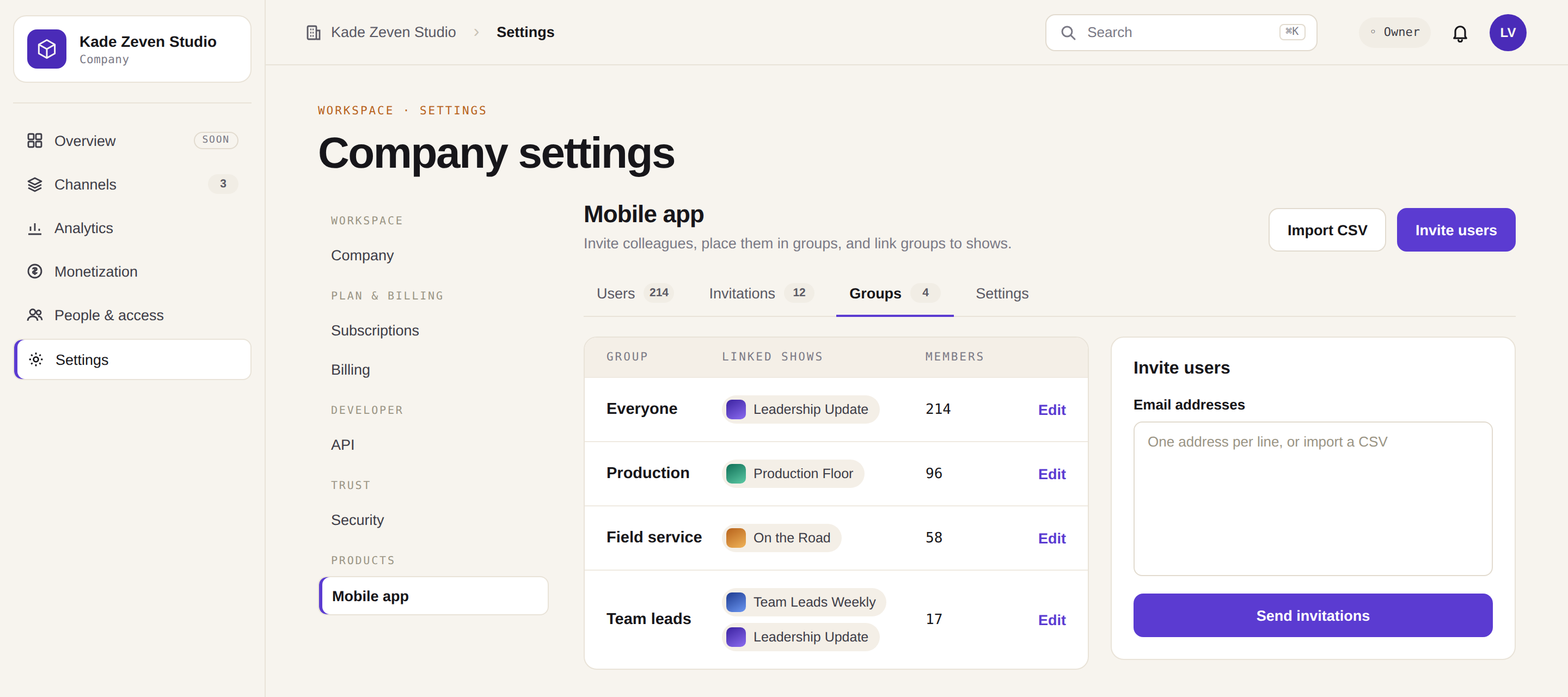
Groups decide what someone sees. In Springcast Pro, under Company settings and then Mobile app, you link groups to shows. Production sees the production show, field service sees theirs, and everyone sees the leadership update.
Leave a group off a show and that show does not exist for them. One colleague can sit in several groups, so a team lead in production sees both the production show and the one for team leads.
Access itself runs per person. The same admin holds the invitations and, for each user, their status, how they sign in (locally or with single sign-on) and 2FA. A device removed from the profile loses access the next time the app starts. That is the part your IT department wants to hear first, and it is also what keeps the podcast internal when a colleague leaves.
What the content team sees back
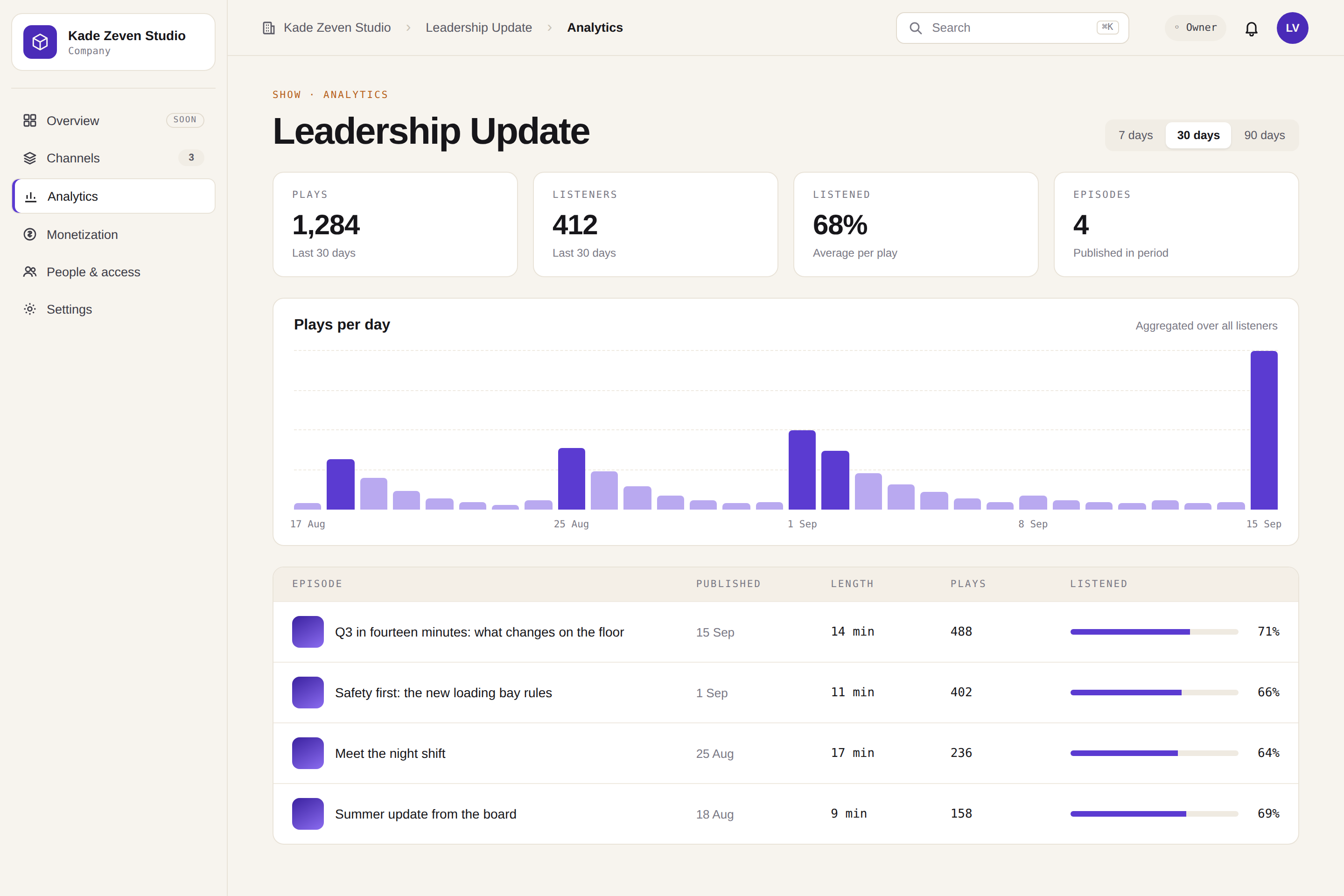
The question arrives in the second week: does anyone listen? For the mp3 on the intranet, the answer depends on what your intranet reports. For the app, listening behavior per show comes from the analytics module of the platform, the same module the Analytics 3.5 deep dive walks through, not from a separate app report.
Read its numbers the way that deep dive defines them. A listener there is "the closest honest approximation of a person", not a name from your invitation list.
The app's admin adds the reactions: likes and comments per show, with counts per emoji and per episode. Likes and comments can each be switched off for the whole app.
The listening numbers are aggregated. You can tell leadership how the show is doing without reporting on one colleague, and that is the only version of this report you want to make.
Report it monthly, in the same order, with the handful of metrics the analytics deep dive suggests for an internal show. After a quarter, the trend does the talking.
Fifty colleagues or five thousand: the price does not move
The number of listeners is not on the invoice. Fifty colleagues or five thousand makes no difference to the price.
That matters more than it sounds. With a price per seat, every extra listener is a cost line, and the rollout stays in the pilot group where the budget was approved. Here the pilot group is the start, and the rest of the organization is a list you import.
A first rollout: one group, one show, thirty days
Pick one group and the show they would miss most. The group your intranet reaches least is a good place to start, and so is the one whose manager asks most often whether the update landed. Invite them, name the show, and get them to follow it before the first episode. Publish that episode with one call-to-action, so listening ends in something you can count: a form filled or a session booked.
After thirty days, open the analytics on that show and look at its plays and listening behavior. That is your case for the next group, in the numbers of your own organization.
Then add the next group. There is no price per mobile user, so the only question left is who is next.
What the app does not try to be
It is not an intranet. The app carries podcast episodes, audio and video. Your intranet keeps its pages and forms; the app is where your episodes reach the people they are for.
Which plans include Springcast Mobile
- Springcast Mobile is part of Company and Enterprise.
- Company Light does not include it.
- Single sign-on is an option.
- There is no price per mobile user and no listener limit.
An onboarding and training module
Springcast's onboarding and training module is built for employees who are rarely at a computer, such as drivers and field staff. Open to customers as an add-on to Company. Also available with Enterprise. €150 per month on top of Company, including 100 active learners per subscription year, excluding VAT. Courses appear in the same Springcast Mobile app as your internal podcast shows.
If you already use Springcast on Company or Enterprise
Ask us first to activate the app for your organization. Once it is active, log in, open Company settings and then Mobile app. Invite one group, link it to one show, and ask them to follow it.
If you are not on Company or Enterprise yet
The app is set up on request, so the first step is a conversation. Come with the group you cannot reach today in mind, and with the colleague from IT who will ask where the data lives. In the words of our security page: "All processing takes place within the European Economic Area. Our applications run in the Netherlands, Germany and Finland." The certification, in the same words: "ISO/IEC 27001:2022, independently certified by Brand Compliance under RvA accreditation (C 548)."